Paige (AI assistant)
Paige for storybooks
Paige turns a short story idea into a full-color illustrated picture book for ages 3–12. You choose the style and the characters, Paige writes the story page by page, you check it, and Paige illustrates every page with the same characters throughout. The finished book opens in the editor with the story text already on each page.
Before you start
- An active free trial (card required) or subscription. A new trial includes a balance of 40 pages.
- Every storybook needs at least one character (up to 8). You can make them inside the wizard, but it’s easier to set them up first in My Characters.
- A storybook can be 4 to 48 pages. Each illustrated page uses 1 page from your balance, so a 16-page book uses 16. Writing and rewriting the story is free.
Your work is kept in this browser
Step by step
- 1
Open the storybook wizard
Use whichever is closest:
- In the left menu, click Book Generation, then Story Books.
- On your dashboard, click Storybook with Paige (shown as a small Storybook button once you have a few books).
- Go to /paige/new, click Children’s storybook, then Next.
A strip across the top shows the three stages: Brief, Story bible and Generate.
- 2
Pick an illustration style
Under Pick a style (required), click one of the 12 styles: Cute Cartoon, Watercolor Storybook, 3D Animated, Anime / Chibi, Classic Ink & Watercolor, Colored Pencil, Cut-Paper Collage, Mid-Century Gouache, Crayon & Pastel, Soft Clay, Folk Art or Graphic Novel. Each card shows a sample and the ages it suits best.
The style comes first because your characters are drawn in it. As the page says, “You can’t change it after generation begins.”
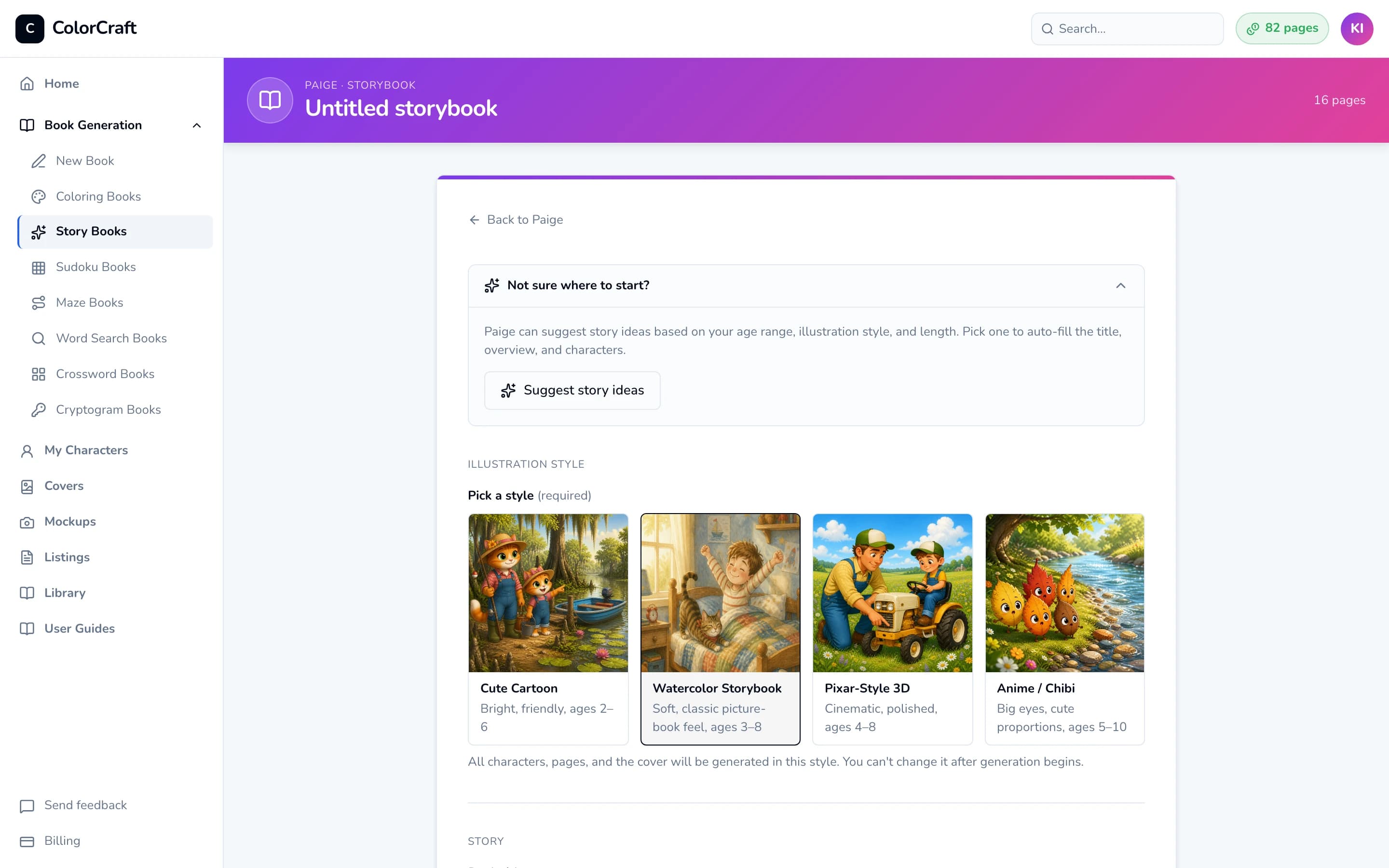
Step 1 starts with the illustration style. Everything in the book is drawn in it. - 3
Optional: let Paige suggest a story
Open Not sure where to start? and click Suggest story ideas. Within a minute or so you’ll see “5 ideas — pick one”. Each card has a title, a short plot and a list of characters.
Click an idea to fill in the title and story overview. If you’ve already picked a style, Paige also creates the idea’s characters and draws three looks for each. This is free and takes about 30 seconds, during which the card shows “Creating N characters…”. When they’re ready you’ll see “Tap each cast chip below to pick a look.” Do that in step 4.
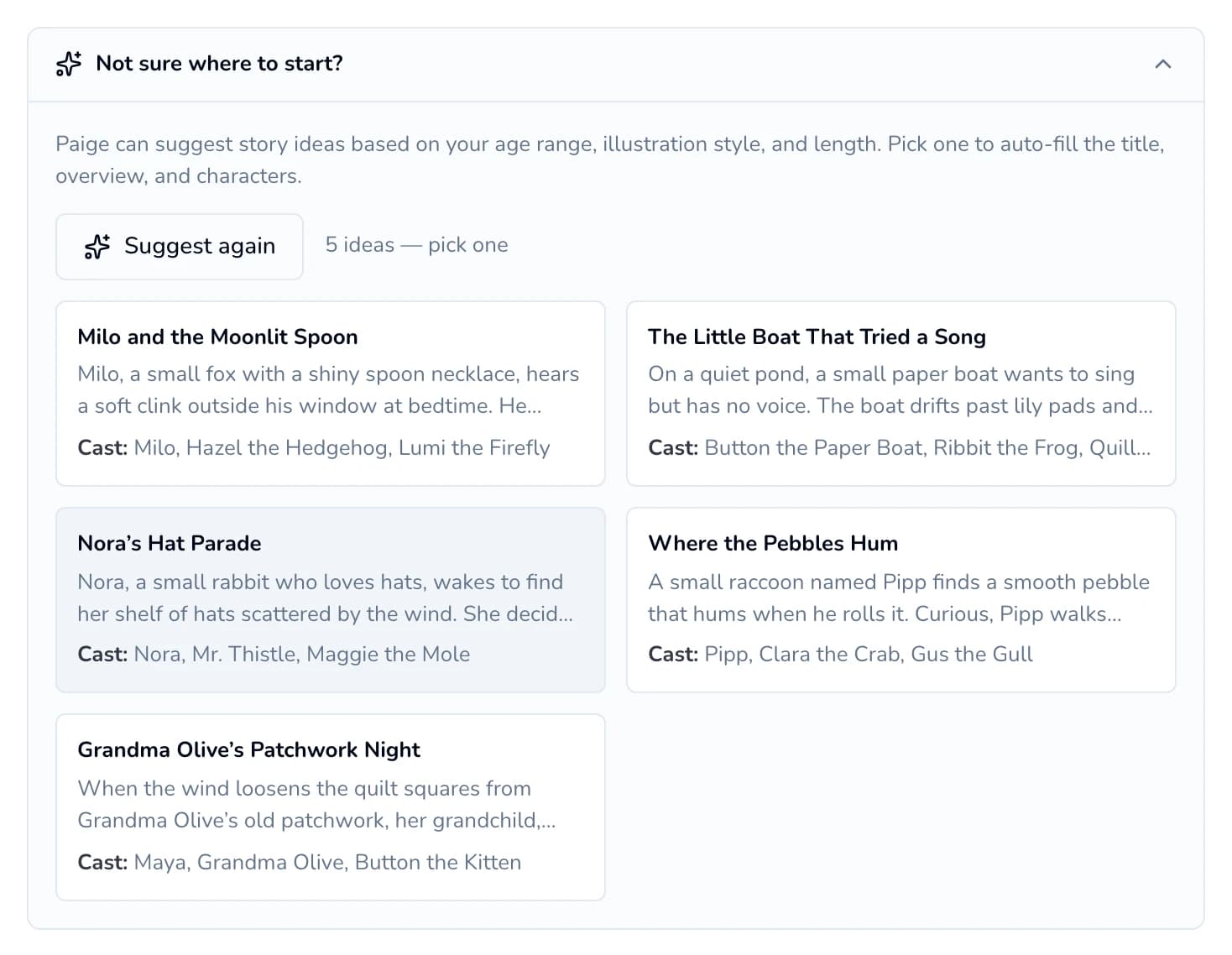
Story ideas include a cast. Pick a style first so Paige can create the characters for you. - 4
Write the story brief and choose your cast
Under “Story”:
- Book title: up to 100 characters.
- Story overview: the plot from beginning to end. It needs at least 10 characters, and 50–500 words works best.
- Cast: click Add from library, then click a character in the “Pick from your library” window. The window closes after each pick, so click Add from library again for each character. To make someone new, click Create new. The counter shows how many you have, up to “8/8 characters”. Under the cast you can give each character a role in this book (Hero, Friend, Grown-up, Pet, Helper or Other) so Paige knows whose story it is.
Under “Story style” (all optional): pick a tone (Cozy, Silly, Adventurous, Heartfelt or Bedtime), add a theme or lesson such as “sharing”, and tick Write it in rhyme for rhyming couplets. Paige also uses your book title when it writes the story.
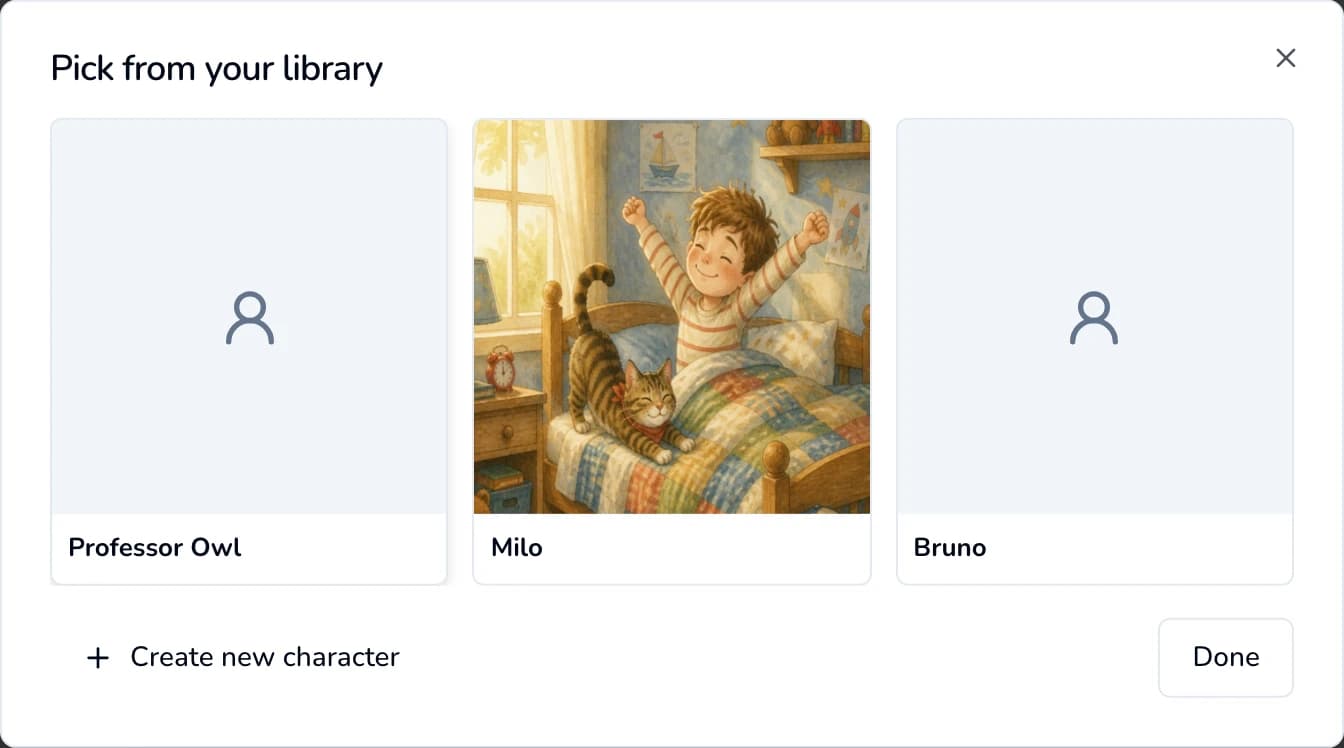
Pick one character at a time from your library. A character drawn by Paige gets drawn in this book’s style when you add them, which takes up to a minute (“Drawing…”). If their chip then says Needs a look, click the chip. In the window that opens, click the picture you like so it shows a check mark, then click Save character. Do this for every character with that label. A character with uploaded photos never needs a look picked.
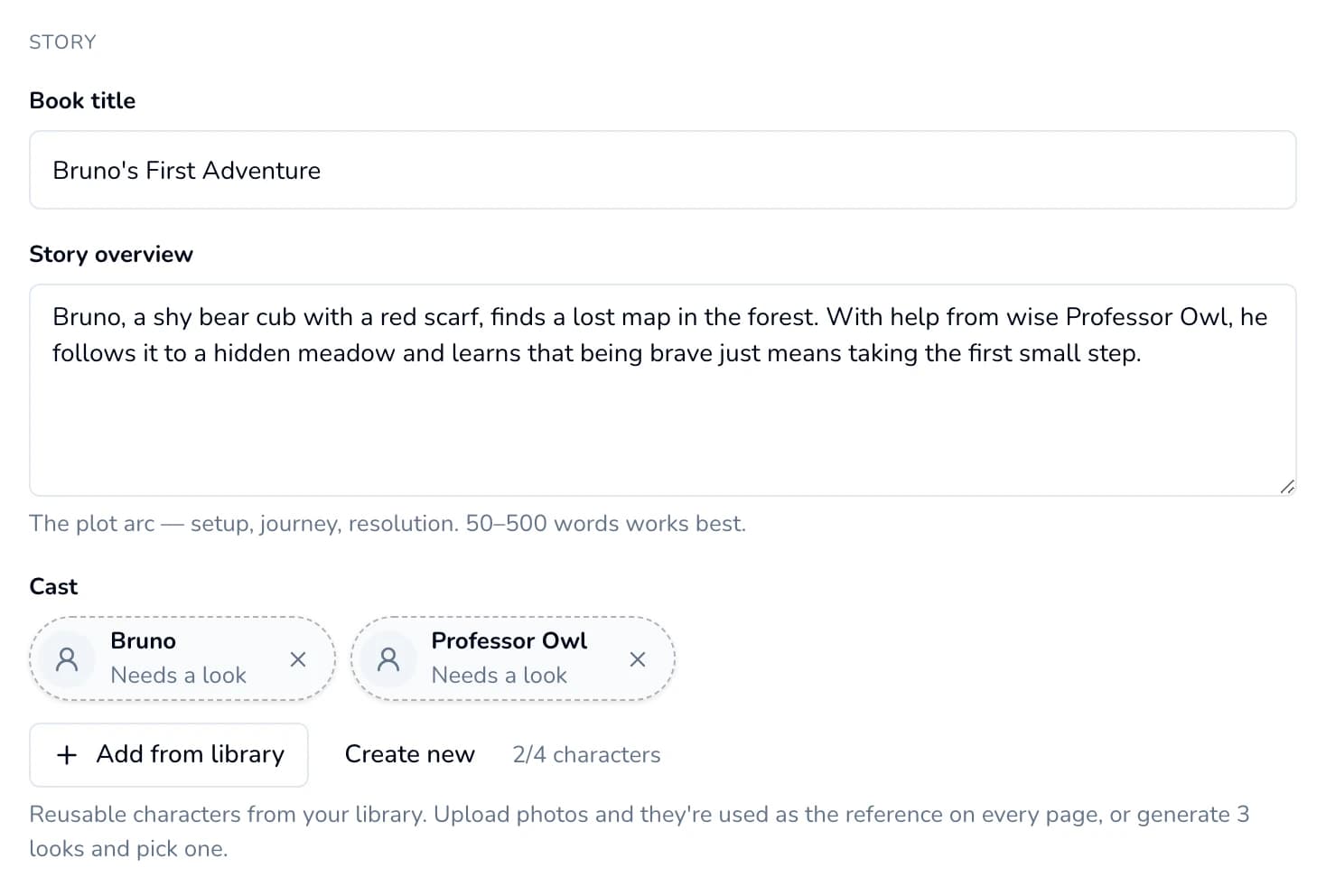
Chips that say “Needs a look” still need a picture chosen. Click each chip to pick one. 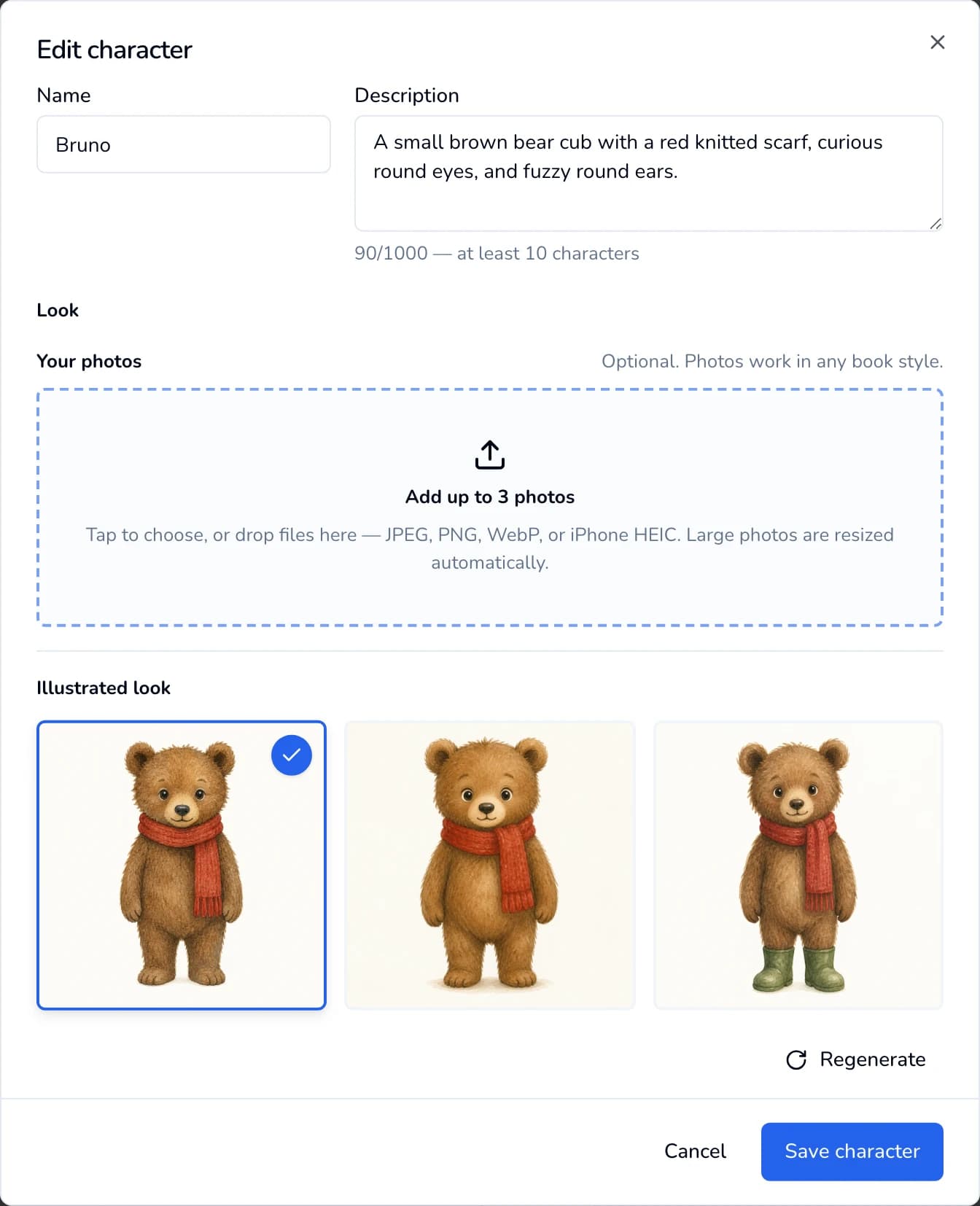
Click a look so it shows a check mark, then click Save character. - 5
Choose the age range and format
- Age range: Ages 3–5 (default), Ages 6–8 or Ages 9–12. Paige matches the wording to the age you pick.
- Page count: click 8, 16, 24 or 32, or type any number from 4 to 48 in the box after “or”. The line underneath shows what the book will use (1 page from your balance for each page) and how many you have.
- Page format: 8.5 × 8.5 (default), 8 × 8, 8.5 × 11, 8 × 10, 7 × 10 or 6 × 9. The square sizes are the classic picture-book shape.
- Text font: Lato (default), Poppins, Spectral or Helvetica. The story text on every page uses this font.
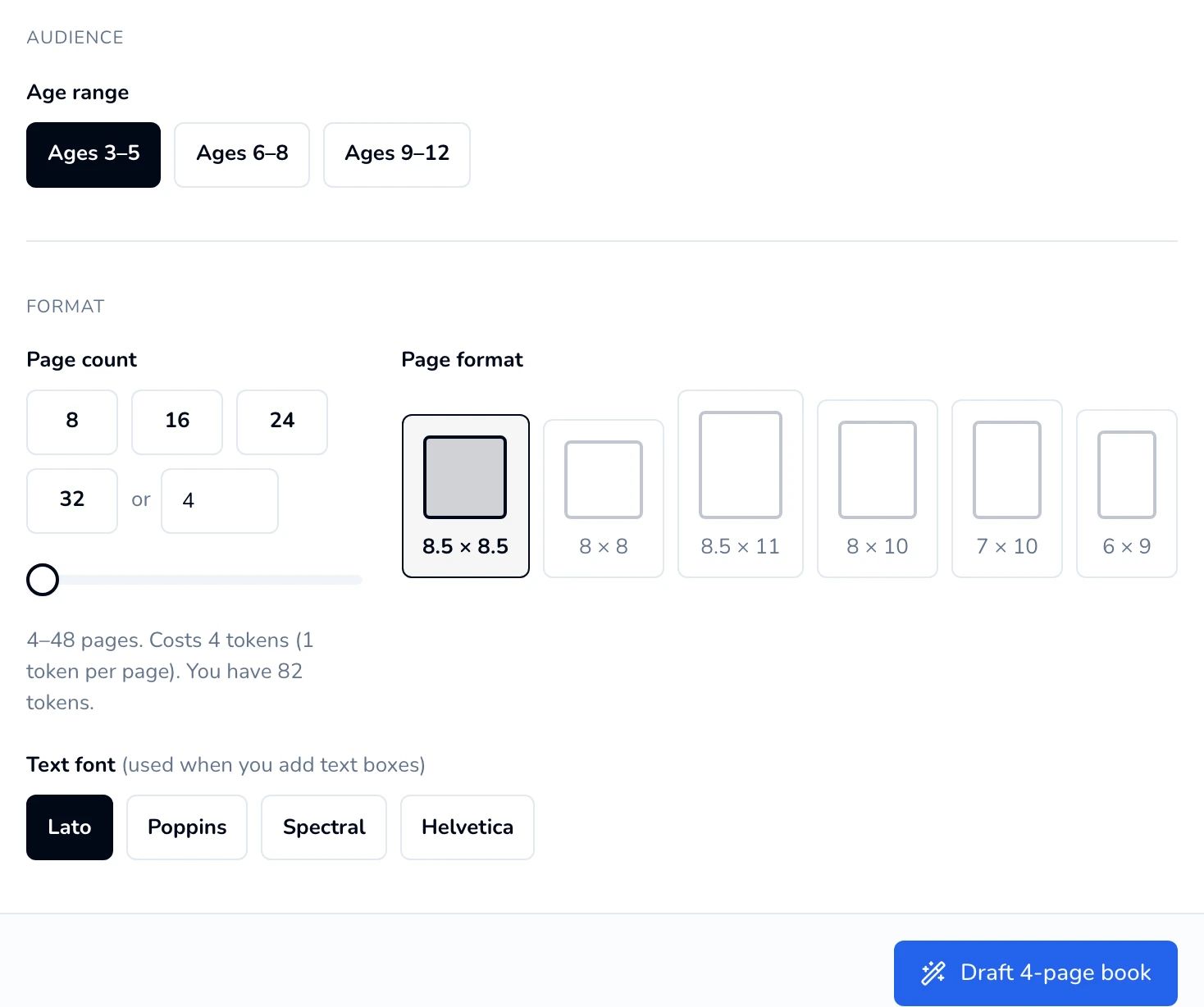
The cost line updates as you change the page count. - 6
Let Paige write the story
Click Draft N-page book (for example, Draft 4-page book). Paige writes the story page by page. This is free and can take up to about a minute and a half for long books.
The button stays greyed out until you’ve picked a style, entered a title and an overview, and added at least one character.
- 7
Review the story bible
The story bible is Paige’s plan for the book. Nothing comes off your balance until you click Generate book. At the top, the Story plan sums up the problem, the turning point and the ending Paige wrote towards. You can change:
- Locations: the places that come up more than once. Change a name or description here and every page set there follows.
- Recurring objects: things that matter to the story, such as a red kite. Each one is drawn from the same description on every page it appears on.
- Each page: the location, the time of day (Dawn through Overnight, or “Any time”), the camera framing (Wide, Close-up and so on) and the story text printed on the page.
- On this page: click a character to add them to the page or take them off it. Only the characters shown here are drawn on that page. A page with nobody selected shows just the setting.
- Show image prompt: reveals the instruction the illustrator follows for that page. Edit it to change what’s drawn. Naming a character in it adds them to the page. Underneath, you can note clothing that differs on that page, such as “Mia wears yellow pajamas”.
Rewrite on a page writes a new version of just that page, keeping it in step with the pages around it. You can say how it should change, such as “make it funnier”. Keep marks a page you’re happy with: Redraft rewrites the rest of the story from your brief and leaves kept pages exactly as they are. Read aloud shows only the words, a page at a time, so you can hear how the story flows. Back returns to the brief.
Keep it short
Keep each page’s story text to 300 characters or fewer and each image prompt to 500 characters or fewer. Longer text can’t be generated, and short text also reads better on a picture-book page.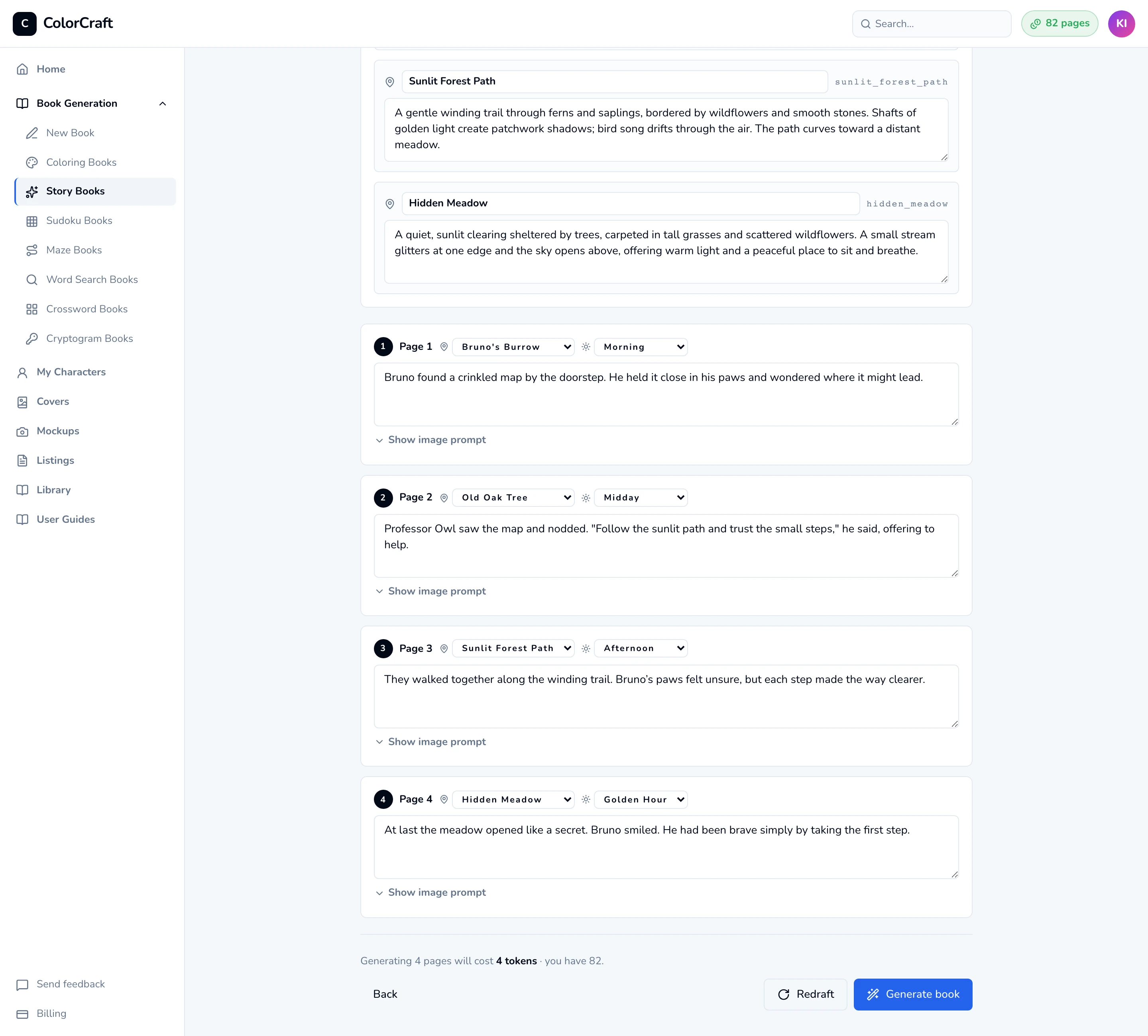
Step 2, the story bible. Edit anything, then click Generate book. The story isn’t locked once you click Generate book. In the editor, the Story panel on the left lists every page, drawn or not, and Edit on a page changes its text, place, time of day, characters and (under Advanced) what the picture shows. See step 9.
- 8
Generate the book
Click Generate book. This is the step that uses your balance: 1 page for each illustrated page.
For books of 8 pages or more, Preview 2 pages first is ticked unless you untick it. Paige draws page 1 and the book’s big moment, then waits. Check the characters and the style, click Redo page on either one if something’s off (1 page from your balance), then click Looks good — generate the rest. A wrong look uses 2 pages of your balance instead of the whole book.
The Generate screen shows a status line (such as “Generating scene 2 of 4…”), a counter (“1/4 rendered”), a progress bar and a tile for each page that fills in as it’s drawn. Paige illustrates one page at a time and checks each picture against its words, redrawing it once if someone’s missing or shouldn’t be there. A 4-page book took about a minute in our test; longer books take a few minutes. When it stops, each tile has a redo button that redraws that page in place (1 page from your balance).
You can close the tab. Generation keeps running, and the book shows under “Work in progress” at the top of your dashboard. Click Resume there to come back to this screen.
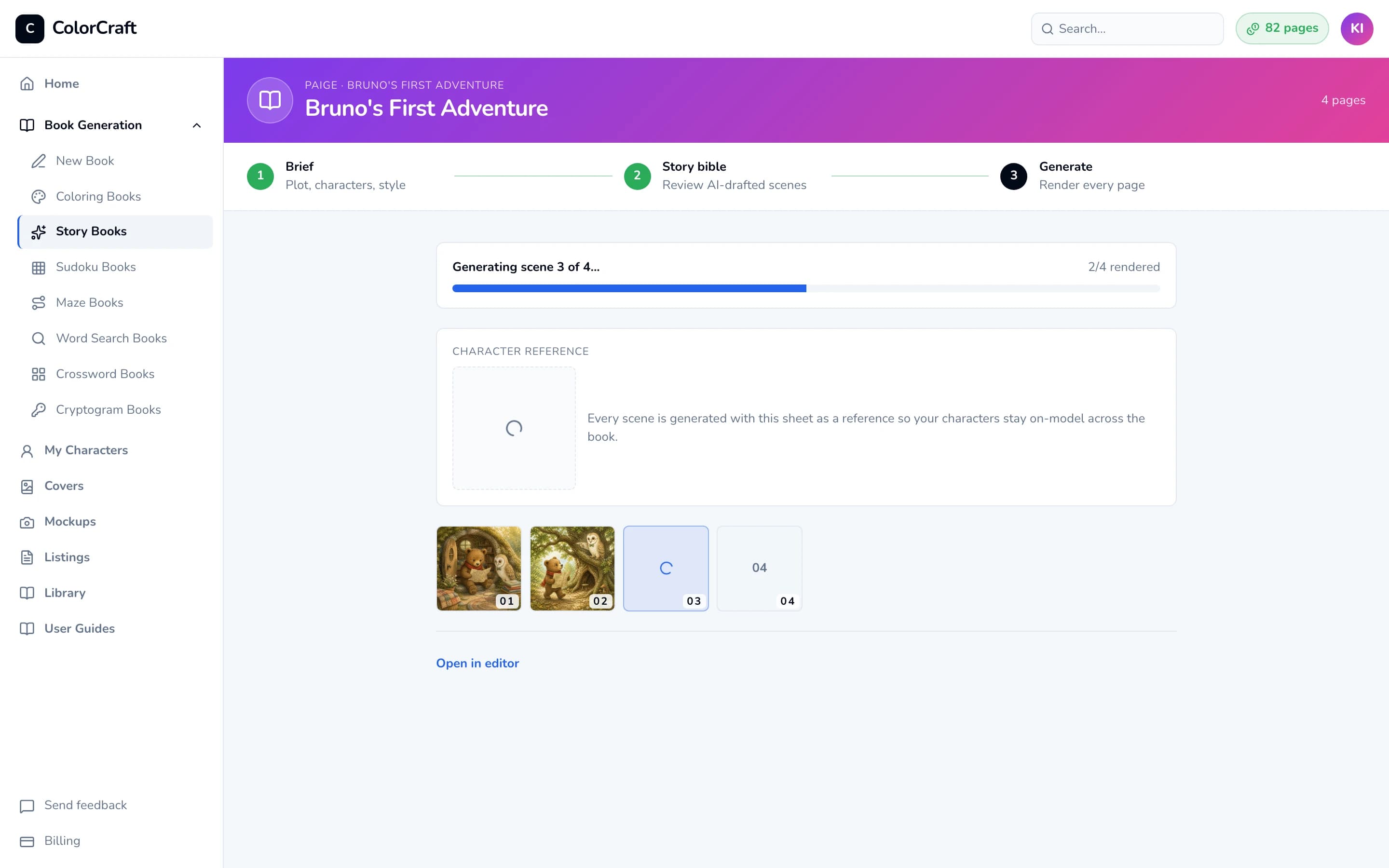
Step 3. Pages appear as they’re illustrated. You can leave and come back from your dashboard. - 9
Finish in the editor
When generation finishes, Paige opens the book in the editor for you. Each page already has its story text in a text box, in the font you chose. The Storybook panel on the left lets you:
- Edit a page’s scene text.
- Re-insert it with Insert as text box.
- Make every text box fit its text with Fit all text boxes.
- Redraw a single page under Regenerate page image (each redraw uses 1 page from your balance). Click the characters to choose exactly who is drawn on that page; the page keeps its place in the book.
The Story panel below it shows the whole story, page by page. Click Edit on any page to change its text, place, time of day or characters, or, under Advanced, what the picture shows, then click Save. Saving is free. A page Paige hasn’t drawn yet, such as one waiting behind the 2-page preview, is drawn with your changes; while Paige is drawing, edit those pages once she finishes. A drawn page keeps its picture until you click Redraw this page (1 page from your balance). Change the words printed on a drawn page in its text box on the canvas: Paige updates the text box for you when the page is open.
Your first storybook earns a one-time bonus of 10 pages.
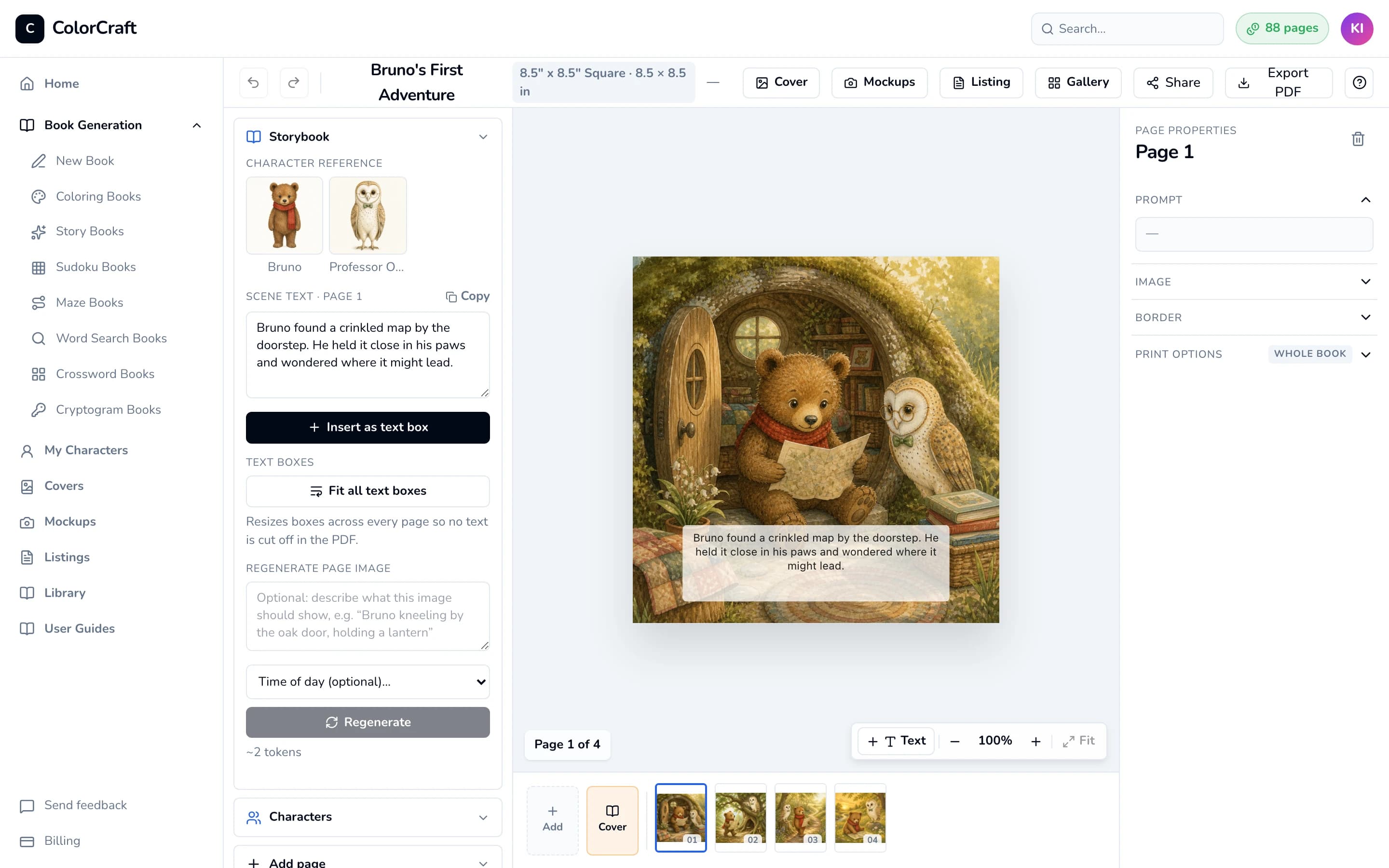
The finished storybook in the editor, with the story text already on the page.


Already wrote your story?
Bring your own manuscript and Paige illustrates it, keeping your words exactly as you wrote them. At the top of the storybook wizard, choose I already wrote my story (or start here).
- Paste it, or upload a Word (.docx), PDF or text file up to 3 MB. The file is read once to get the text and isn’t kept. Tick the box to confirm you wrote the story or have the rights to use it.
- Check your pages. If you marked your own page breaks (“Page 1”, “Page 2”… or a line of
---), Paige follows them; otherwise it suggests where the pages turn. Merge or split any page. The title page, dedication and “The End” are set aside and you can put them back. Notes for the illustrator (“Illustration: …”) guide that page’s picture and are never printed. - Pick a style. The characters Paige found join your cast and their looks are drawn for you. Pick one for each, then click Plan the illustrations.
- Review and generate as usual. Your words are marked Your words; if you’d like a second opinion, click Suggest edits on a page and choose Use this or Keep mine. Nothing changes unless you accept it.
A page can hold up to 600 characters; pages longer than Paige’s usual 300 are printed in smaller type so the picture stays clear. A picture book has 4 to 48 pages.
Keeping characters consistent
Paige shows the illustrator each character’s uploaded photos, or the look you picked, on every page that character is on, so the same faces appear throughout the book, and characters who aren’t on a page aren’t shown to the illustrator for it. For that to work, every character in the cast needs either photos or a picked look. If even one still says Needs a look, Paige draws everyone from their written descriptions instead, and they may drift from page to page. Clear every Needs a look chip before you click Draft N-page book.
If you change the style after adding characters, a note says a character “was drawn for a different style”. Click Redraw for this style. It’s free.
If something goes wrong
- Draft N-page book is greyed out. The line next to the button says what’s missing: a style, a title, an overview of at least 10 characters, or at least one character in the cast. If a red box says “Not enough pages”, lower the page count, or click the button in the box to get more: Upgrade now on a trial, Upgrade plan on a plan.
- “Could not draft story bible”. Wait a moment and click Draft N-page book again. A shorter overview often helps.
- A field is outlined in red, such as “Page 2 needs story text”. Generate book checks every page first and jumps to the first one to fix. Fill in what’s empty (story text, image prompt, or a location’s name or description) or shorten what’s too long (story text up to 300 characters, image prompt up to 500), then click Generate book again.
- “You have 3 storybooks generating already. Wait for one to finish before starting another.” Up to three storybooks can generate at once. Wait for one to finish, then click Generate book again. Your story bible is still on screen.
- “Generation stopped” mentioning the safety filter. The AI’s safety filter blocked a character or scene. Click Retry once, because some blocks are temporary. If it stops again, open My Characters and soften the character descriptions: avoid exact ages such as “4-year-old” and action words such as “attack” or “scary”, and keep them warm and concrete. Then start a new storybook. A book that has already started keeps the descriptions it began with.
- “Network hiccup: … Retrying…”. Your connection dropped for a moment. Generation carries on and the page reconnects by itself.
- I closed the tab. Open your dashboard and click Resume on the book under “Work in progress”. If it has already finished, the book is in your book list.
- A character is on a page they shouldn’t be. Don’t delete the page: pages after it move up, and an added page goes to the end. Open the page in the editor and, under Regenerate page image, click characters until only the right ones are selected. Then click Regenerate. Before generating, you can fix this in the story bible under each page’s On this page.
- A page is missing. Pages Paige couldn’t illustrate aren’t charged. In the editor, use the Add page section of the left sidebar to add one; it uses 1 page from your balance.
What it costs
- Each illustrated page uses 1 page from your balance. A 4-page book uses 4 and a 16-page book uses 16. See Pages & billing for how your balance works.
- Free: story ideas, writing and redrafting the story bible, and creating characters and their looks.
- Bonus: your first finished storybook adds 10 bonus pages to your balance.
Start a storybook
Pick a style, choose your characters, and let Paige write and illustrate every page.
ColorCraft’s 7-day trial needs a card.