Paige (AI assistant)
Paige for coloring books
Paige is the AI assistant that plans and draws a whole coloring book for you. You describe the book once, Paige writes a drawing prompt for every page, you check the list, and Paige draws all the pages while you get on with something else. This guide walks through every screen, start to finish.
This is the from-scratch wizard
Before you start
- An active free trial (card required) or subscription. A new trial comes with a balance of 40 pages, which is enough for a full first book.
- Each page Paige finishes uses 1 page from your balance. The balance is at the top of the screen, for example “40 pages”.
- A rough idea: who the book is for and what it’s about. If you don’t have one yet, Paige can suggest some (step 2).
- About five minutes of your time. The drawing itself happens in the background.
Step by step
- 1
Open the coloring book wizard
Use whichever of these is closest:
- In the left menu, click Book Generation, then Coloring Books.
- On your dashboard, click the Coloring book with Paige card. Once you have a few books it shrinks to a small Coloring book button under “Start a book”.
- Go to /paige/new, leave Coloring book selected, and click Next.
You land on a page with a purple header that reads “Paige · Coloring book” and a card labelled Brief, “Step 1 of 4”.
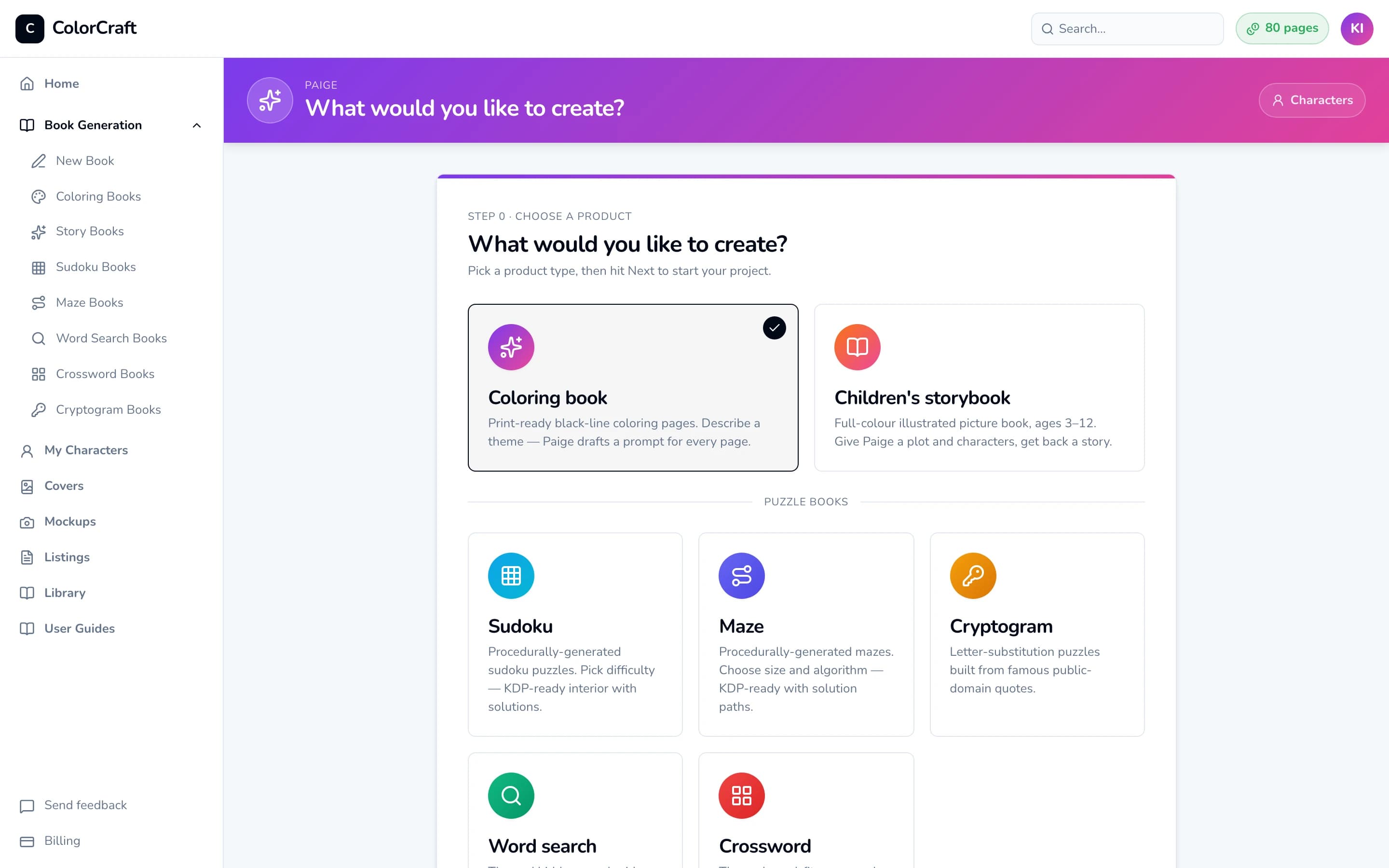
The /paige/new chooser. Coloring book is selected by default. Click Next to continue. - 2
Optional: let Paige suggest an idea
If you’re not sure what to make, open the Not sure where to start? panel at the top of the card. It opens by itself while the title is empty. Click Suggest niches. After a few seconds you’ll see “5 ideas — pick one”.
Click an idea to fill in the title, theme and description for you. A message confirms “Niche applied”, and you can still edit everything. Click Suggest again for a new batch. Suggestions are free.
Ideas are based on the audience and art style you’ve chosen, so set those first (step 4) if you have a reader in mind.
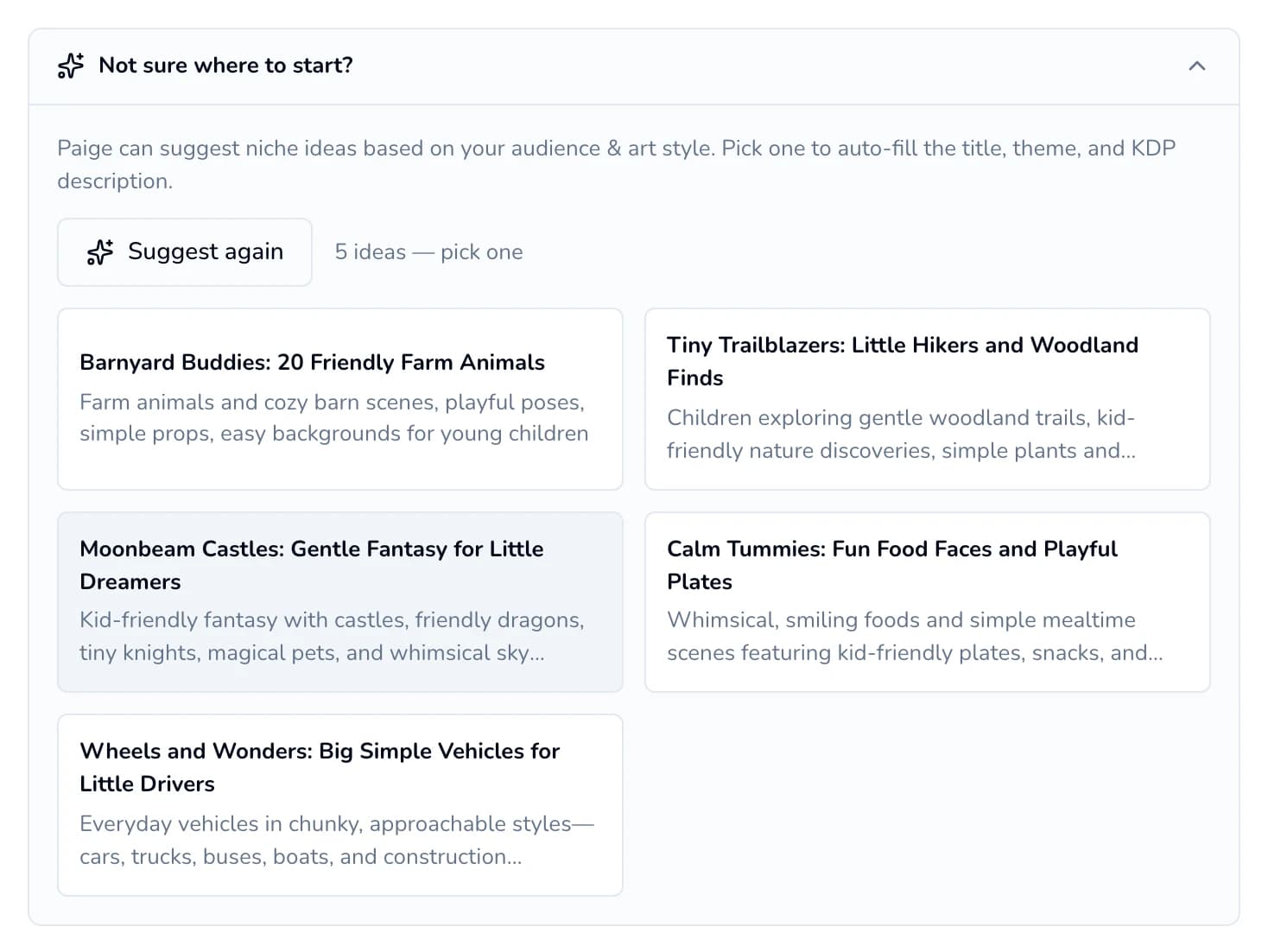
Click any idea to fill in the title, theme and description. - 3
Describe your book
Under “About your book”, fill in:
- Book title (required, up to 100 characters). This becomes the book’s name in your library.
- Theme & subject (required, up to 200 characters). Paige writes every page from this, so be specific about the mood, characters and setting. For example: “Friendly forest creatures going about their day — a fox sketching by a stream, a bear reading under a tree.”
- Marketing description (optional, up to 1,000 characters). This is the blurb for your KDP listing. Paige’s idea cards fill it in for you.
The purple header updates to show your title and page count as you type.
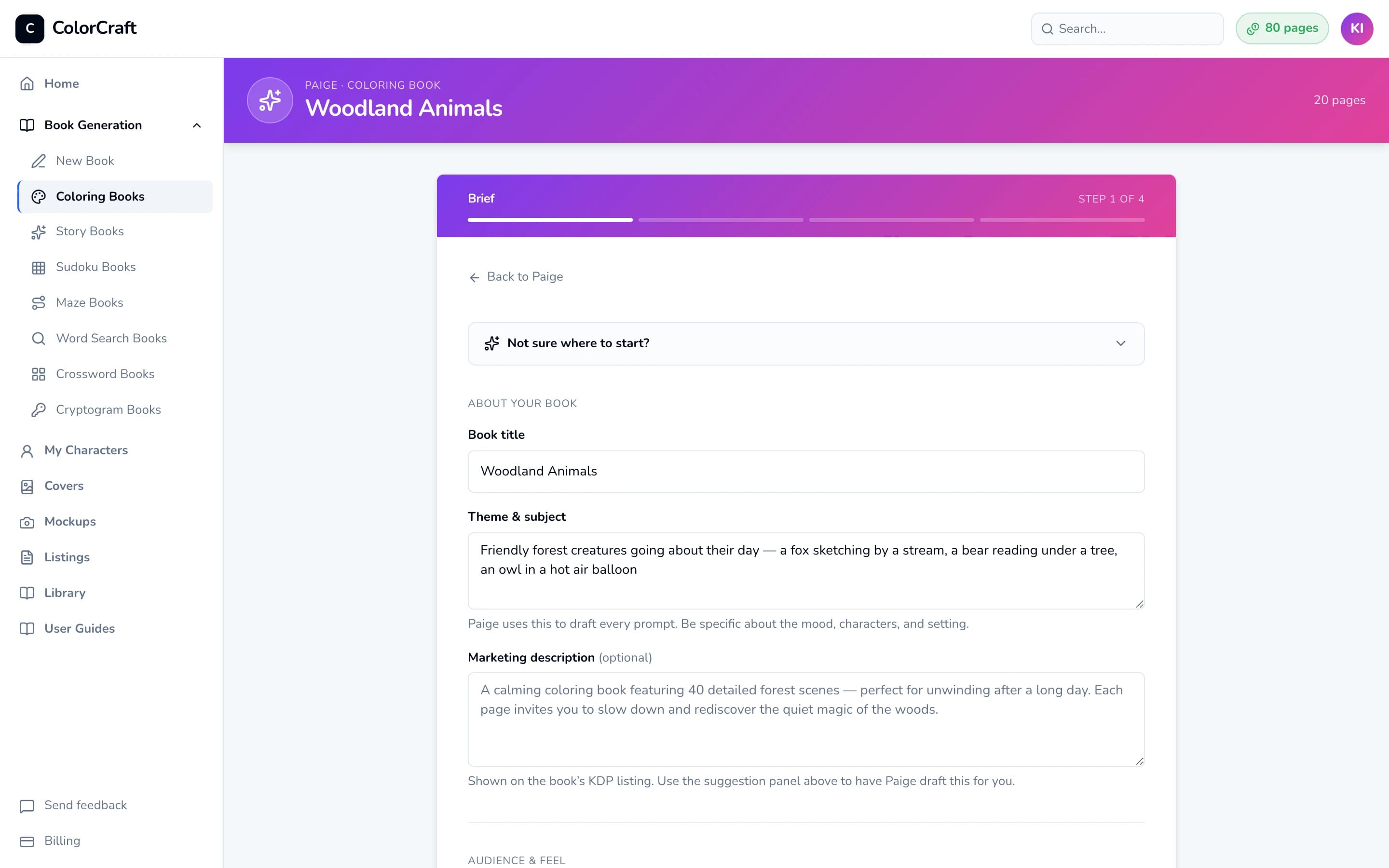
Step 1, the brief. Book title and Theme & subject are the only required fields. - 4
Choose the audience and art style
Under “Audience & feel”, click an Audience: Kids (4–8), Tweens (9–12), Teens (13–17), Adults or All ages.
Then click an Art style card. There are 11 to pick from:
- Standard Coloring Book: Clean balanced line art on white. Versatile — works for almost any subject.
- Kids Coloring Book (the default): Bold cartoon outlines, big fillable spaces, friendly characters.
- Cozy & Cottagecore: Warm illustrative scenes, hygge atmosphere, cute animals in human roles.
- Intricate Patterns: Mandala, zentangle, dense decorative patterning for stress relief.
- Detailed & Realistic: Precise pen-and-ink with crosshatching — vehicles, architecture, nature.
- Bold & Mature: Confident thick-line illustration with dot-pattern shading. For adult coloring books with mature themes, camp, or edgy humor.
- Stained Glass: Leaded-panel design — thick uniform outlines dividing the subject into large fillable glass-cell shapes.
- Anime & Manga: Anime/manga line art — expressive characters, dynamic poses, angular linework, screentone dots for depth.
- Minimalist Line Art: Spare zen line drawing — a single continuous outline where possible, generous negative space, no interior detail.
- Dot Marker Pages: Do-a-Dot style — large printed circles arranged to form pictures for toddlers to stamp or dot with markers.
- Single Subject: One bold central subject on a plain white page. No background, no scenery — beginner and preschool friendly.
Under the styles, pick a Detail level (3 levels):
- Bold & easy: Thick lines, big shapes, little fine detail.
- Medium: Balanced detail with room to color.
- Intricate: Fine lines and rich patterning.
Until you pick one, the detail level follows the audience and style: Bold & easy for young kids and the simplest styles, Intricate for Intricate Patterns and Detailed & Realistic, Medium otherwise. Dot Marker Pages has no detail level to pick: its dots set how busy each page is.
- 5
Optional: add a recurring character
Most coloring books don’t need one. If yours has a mascot who should look the same on every page, use the Characters section. Click Add from library to choose someone you’ve already saved, or Create new to make one now. You can add up to 8, and the counter shows “1/8 characters” and so on.
Paige redraws a character in this book’s style when you add them, which takes 30–60 seconds and is free. If their chip then says Needs a look, click the chip, click one of the three pictures, and click Save character. For the full details, see My Characters.
- 6
Set the page count and page size
Under “Format”:
- Page count: click a preset, type a number in the box after “or”, or drag the slider.
- On a free trial the presets are 8, 16 and 24, and the line underneath reads “5–24 pages on trial, each from your trial balance.”
- On a paid plan the presets are 20, 30, 50, 75 and 100, and the line reads “5–100 pages, each from your balance.”
- Page format: 6 sizes. Click 8.5 × 11 (the default and the most common coloring book size), 8 × 10, 7 × 10 or 6 × 9. For 5.5 × 8.5 and 5 × 8, click Show 2 more sizes first. Each option is drawn to scale so you can compare shapes. Choose now, because the size can’t be changed after Paige draws the pages.
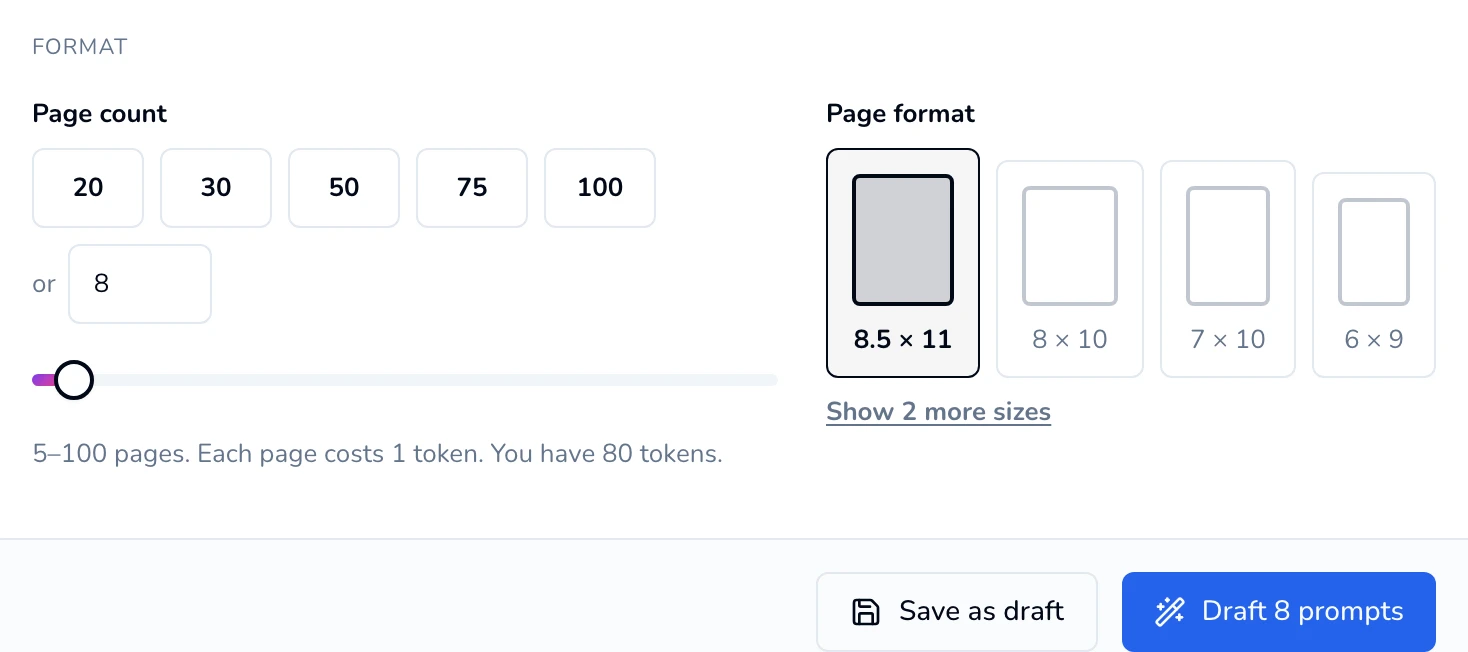
Format, shown on a paid plan. On a trial, the presets read 8 / 16 / 24 and the limit is 24 pages. - Page count: click a preset, type a number in the box after “or”, or drag the slider.
- 7
Let Paige draft the prompts
Click Draft N prompts at the bottom of the card (for example, Draft 8 prompts). This step is free and usually takes 10–30 seconds.
Paige saves your brief and takes you to step 2. The address bar changes to a link of your own (/paige/…) that you can bookmark.
Not ready to continue? Click Save as draft instead. See Saving a draft below.
- 8
Check and edit the prompts
The header now reads “Edit prompts”, and the card shows Prompts, “Step 2 of 4”. Each row is the description Paige will draw for one page.
- Edit: click into any prompt and type.
- Reorder: drag a row by the handle on its left.
- Add a page: click + (“Add prompt below”) and write the new prompt.
- Remove a page: click the trash icon. A book needs at least 5 prompts, so the icon greys out at 5.
- Re-draft all: get a completely new list from Paige. This replaces every prompt, including ones you edited.
Edits on this screen aren’t saved until you start drawing in the next step. Finish your changes before you leave or refresh the page.
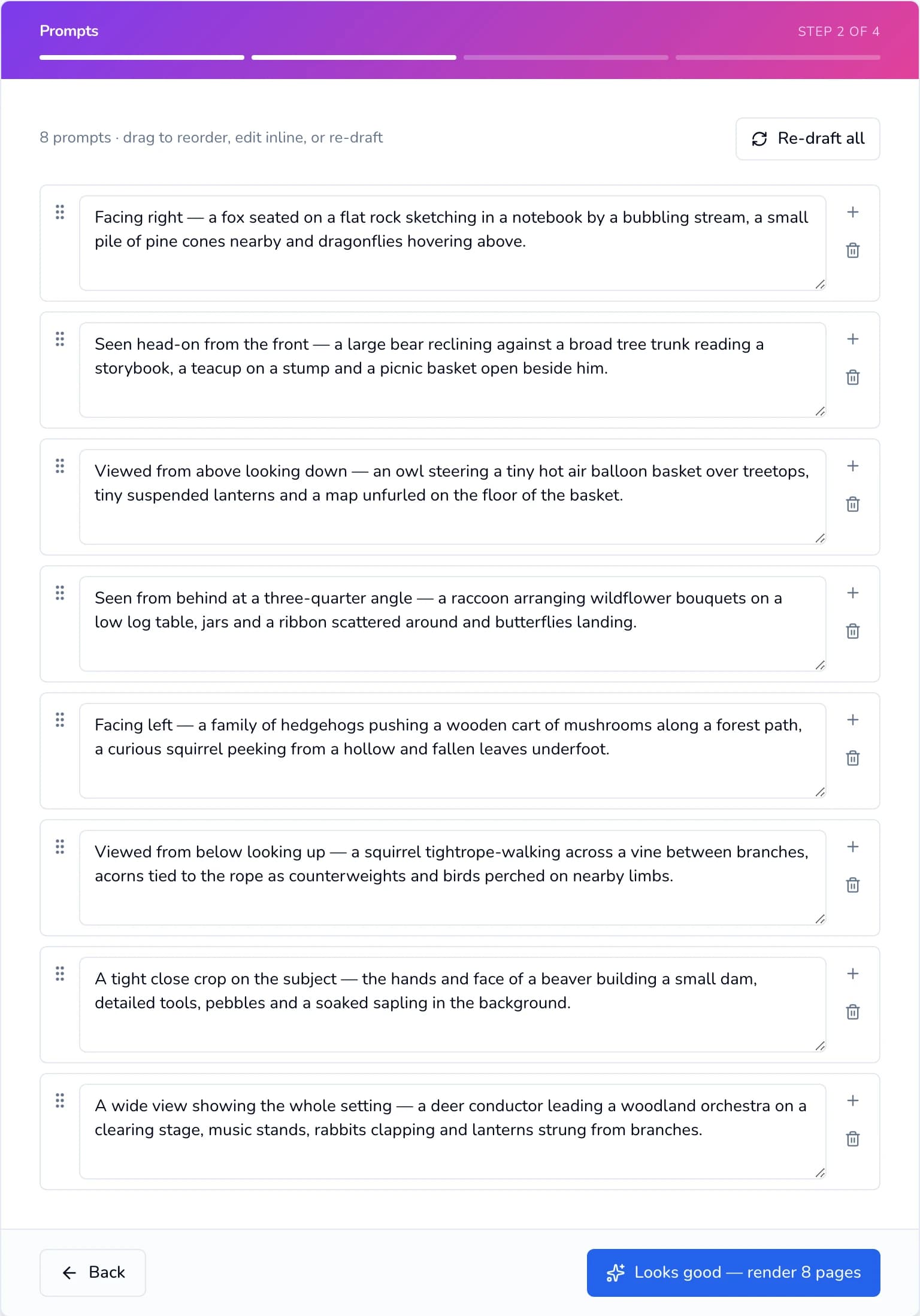
Step 2. Edit, reorder, add or remove prompts, then start drawing. - 9
Start drawing
Click Looks good — render N pages. This is the step that uses your balance: 1 page for each page that finishes, so an 8-page book uses 8. Pages that fail aren’t charged.
The header changes to “Rendering pages”. You’ll see:
- A status line such as “Generating images 1–3 of 8…”
- A counter (“2/8 rendered”) and a progress bar
- One tile per page. Each fills in with the finished picture as it’s drawn. Click a finished tile to see it full size, and use Previous and Next to flip through.
Paige draws three pages at a time, about half a minute per batch. An 8-page book usually takes 1–2 minutes and a 50-page book about 10.
You can close the tab. As the page says, “You can close this page — your images will keep generating in the background.” Your book already appears on your dashboard under its title. To check on it later, open it from there and finished pages show up in the editor as they arrive. Don’t click Looks good — render again from your draft link: that starts a second copy of the book and uses your balance again.
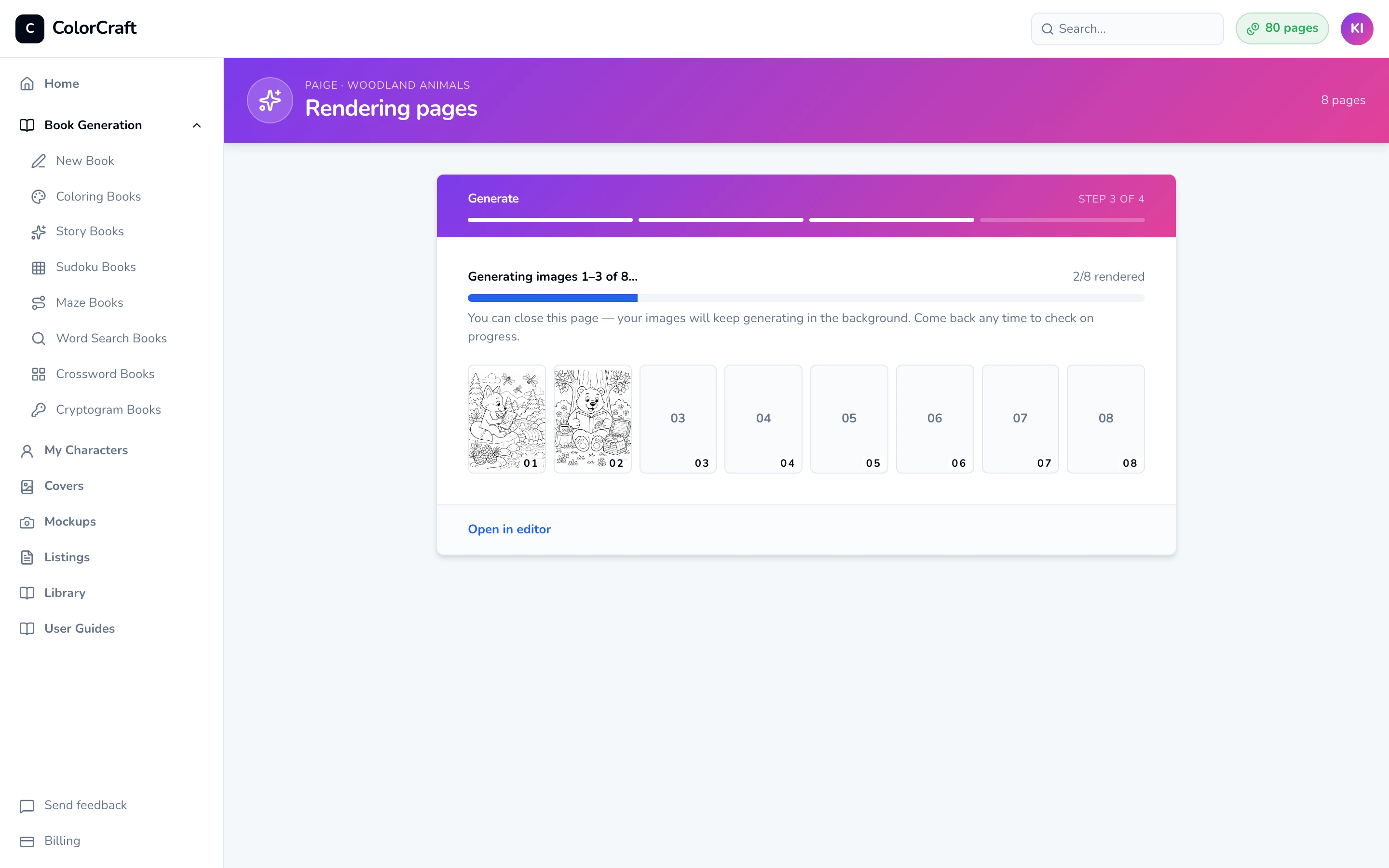
Step 3. Pages appear as they’re drawn. You can close this page at any point. - 10
Open your book in the editor
When every page is done, the wizard moves on by itself. You’ll see a green check, “Your book is ready”, and two choices: Open in editor, or Generate another book to start the next one.
Click Open in editor. Your book opens on page 1, with every page in the strip along the bottom. Count the pages there: if Paige couldn’t draw one, it won’t be in the strip and you won’t have been charged for it. Add a replacement with the editor’s Coloring Page panel. When the pages look right, follow the “Make a cover” banner to start on your KDP cover.
Your first fully finished coloring book earns a one-time bonus of 10 pages.
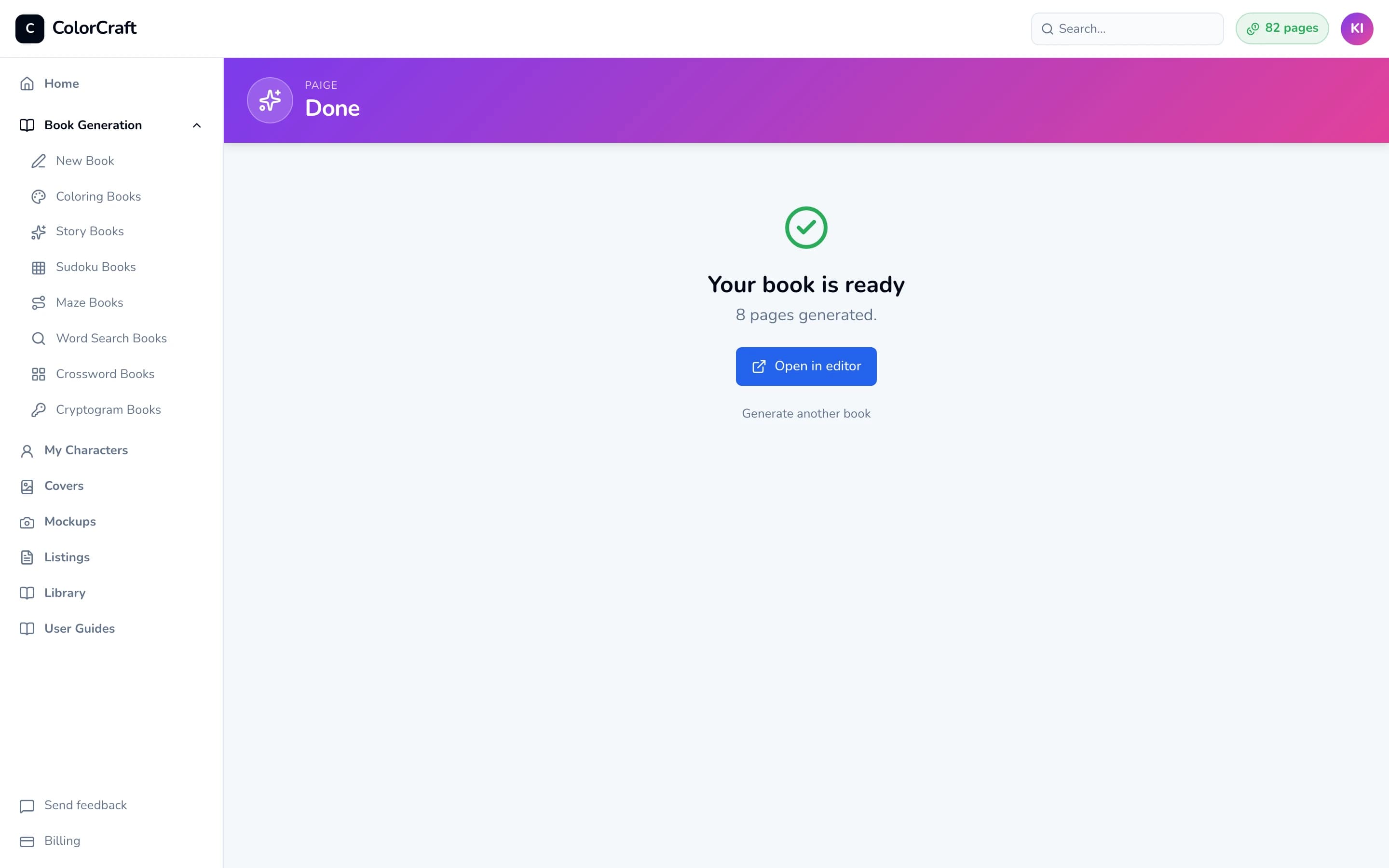
Step 4. Your book is ready. 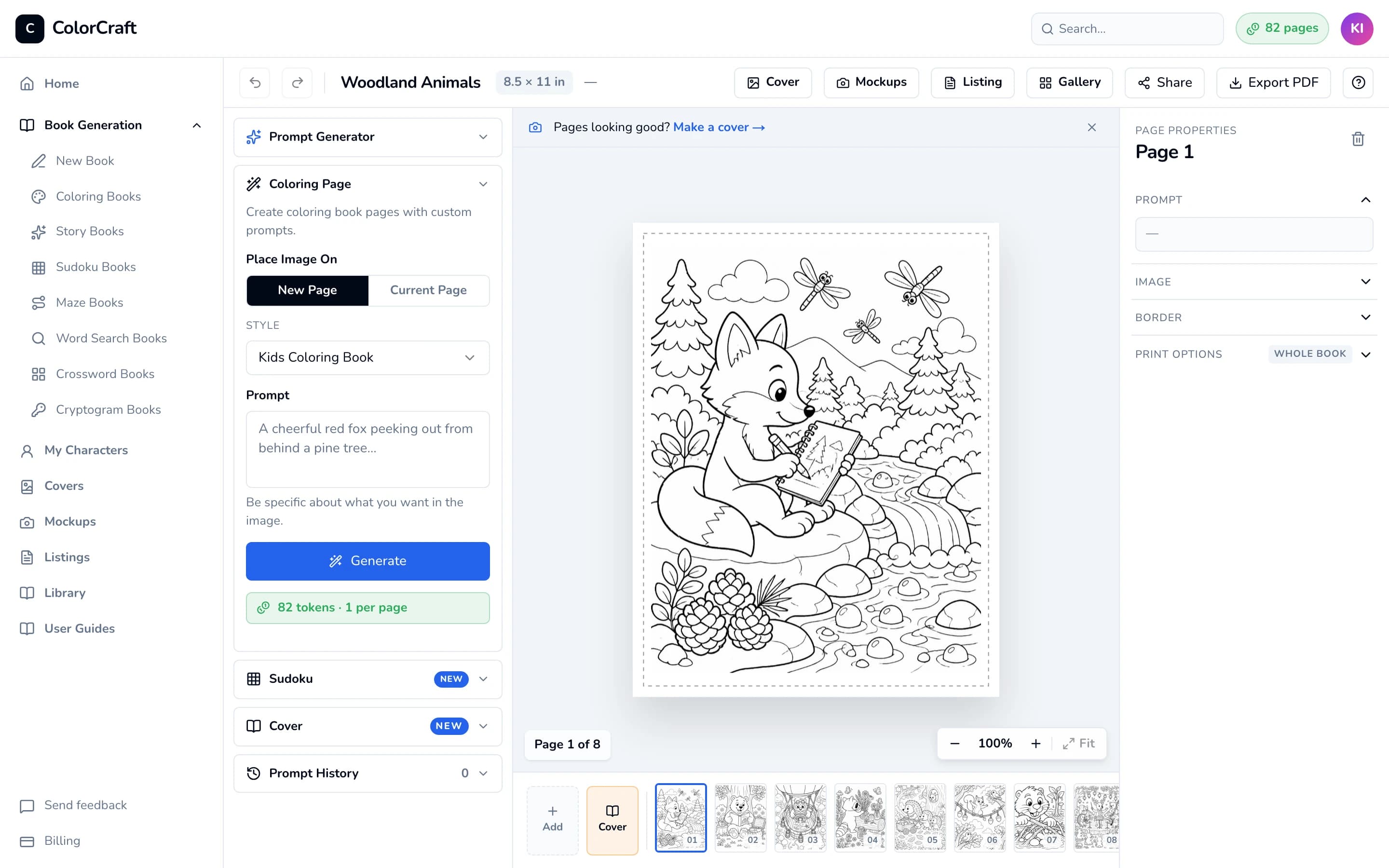
The finished book in the editor, ready for final touches, a cover and export.


Saving a draft and coming back
On step 1, click Save as draft (your title and theme must be filled in). You’ll see “Draft saved”, and the address bar changes to your draft’s own link (/paige/…). Bookmark it. Your draft also appears under “Work in progress” at the top of your dashboard, where Resume reopens it.
A draft keeps your brief and Paige’s list of prompts. Only you can open it. Once you’ve started drawing, find the book on your dashboard rather than reopening the draft.
If something goes wrong
- The Draft N prompts button is greyed out. Fill in both Book title and Theme & subject. If a red box says “Not enough pages — you have X pages and this book needs Y pages.”, lower the page count, or click the button in the box to get more: Upgrade now on a trial, Upgrade plan on a plan.
- “Could not draft prompts”. If the message underneath reads “Invalid request body”, pick one of the 11 art styles in step 4 and one of the 6 page sizes in step 6, then try again. If it reads “Got 18/20 prompts back from the model — try a shorter theme or fewer pages.”, shorten your theme or lower the page count.
- “At least 5 prompts required”. Add prompts with +, or click Re-draft all, until you have 5 or more that aren’t empty.
- “Could not start rendering”. Read the message underneath. Usually your balance is too low: remove a few prompts, or get more pages and try again.
- “Network hiccup: … Retrying…”. Your connection dropped for a moment. Paige keeps drawing on our servers, and the page reconnects by itself.
- The progress says “Stopped at 0/8”. Nothing was drawn and nothing was charged. Click Retry. If it stops again, look for prompts that name characters from films or TV: the AI’s safety filter blocks those. Describe the character by appearance instead (“a small blue alien”), and keep themes family-friendly unless you chose Bold & Mature.
- I closed the tab while it was drawing. That’s fine. Drawing carries on without you. Open the book from your dashboard to see the pages so far.
- The book has fewer pages than I asked for. A page Paige couldn’t draw is left out and not charged. Add replacements from the editor (see Replacing a page’s picture).
What it costs
- Each finished page uses 1 page from your balance. An 8-page book uses 8 and a 24-page book uses 24. Pages that fail aren’t charged.
- Free: idea suggestions, drafting and re-drafting prompts, saving drafts, and adding characters.
- Bonus: your first fully finished coloring book adds 10 bonus pages to your balance.
- Fixing a single page later in the editor works differently. See Replacing a page’s picture and Pages & billing.
Already have a project?
Paige also works inside the editor. Open any project and expand the Prompt Generator panel in the left sidebar. Enter a theme and have Paige draft up to 25 prompts, then click Use this → on any prompt, or Generate all N pages to draw up to 10 at a time. The new pages are added to the end of the book. See the Prompt Generator section of the editor guide.
Open Paige
Start a new coloring book from a short brief and let Paige draw every page.
ColorCraft’s 7-day trial needs a card.