Build a low-content catalog — without the busywork.
Generate coloring pages and Sudoku books from one workflow. ColorCraft handles the production work so you can focus on titles, niches, and what actually sells.
2,500+ creators · No credit card · Free to try
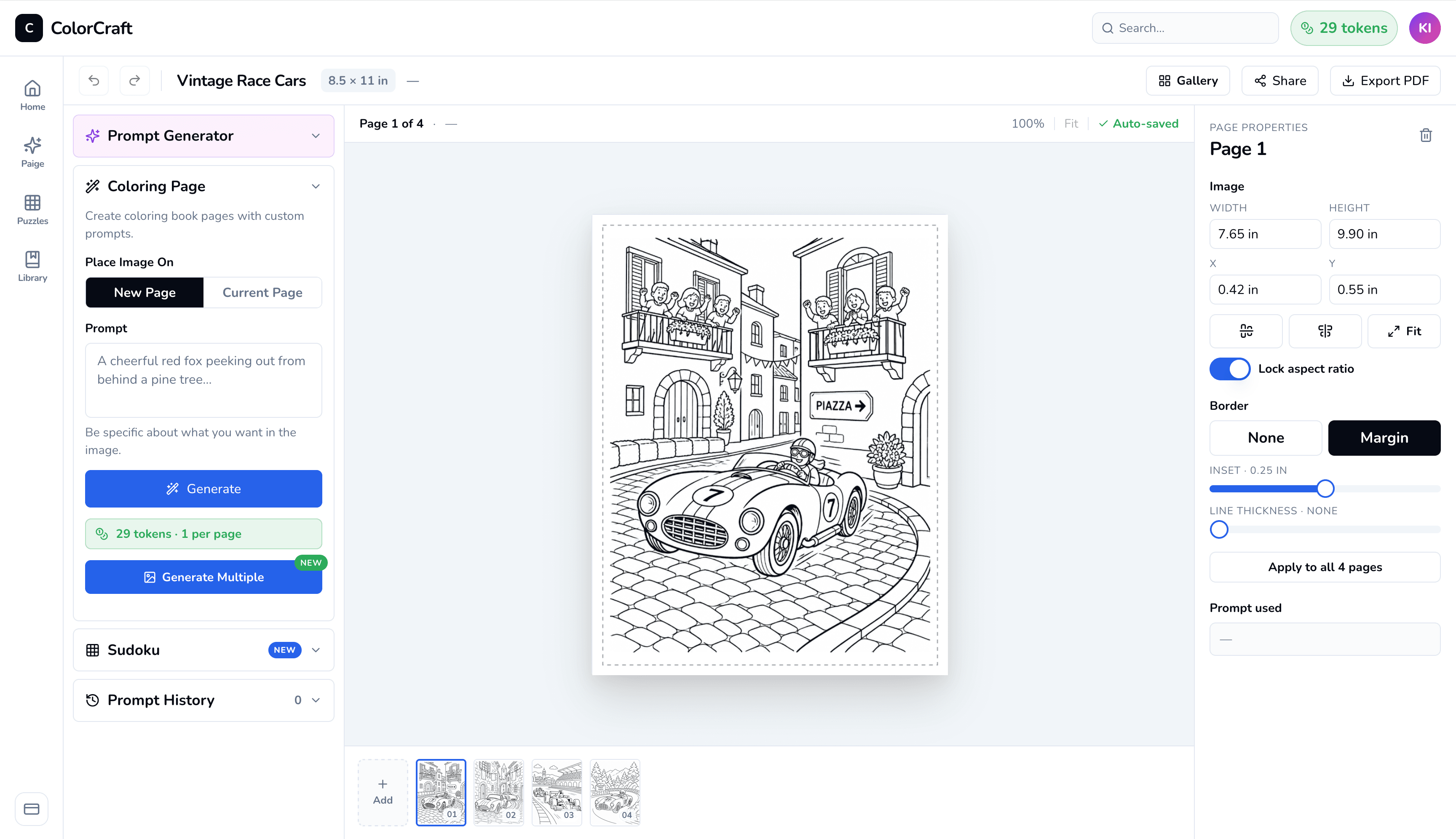
Why publishers switch
Production tooling, not training wheels.
Built for catalog builders.
Low-content publishing is a volume game. ColorCraft is built for the publishers shipping a new title every week, not the ones polishing one book for six months.
Batch generation.
Produce dozens of pages from a prompt set in under an hour. Style stays consistent across a book and across a series.
Print-ready every time.
Correct trim, margins, DPI on every page. Whether you sell on KDP, Etsy, Lulu, IngramSpark, or your own printer, the file works the first time.
Included free on every project
Your Amazon listing, written for you.
When your interior and cover are done, generate a KDP-ready book description and 20 ranked keyword candidates from the project you just built. No copywriter. No extra step.
Description + 20 keywords, ready to paste
One click on the Listing tab. Edit inline if you want, copy each field, walk over to KDP.
Tailored to your project type
The description names the puzzle type, age range, or coloring theme that actually lives in your book — not a generic template.
20 keyword candidates, ranked
Amazon gives you 7 keyword slots. ColorCraft generates 20 ranked candidates so you can keep the ones that fit best.
KDP-compliance built in
No URLs, no review solicitations, no banned promotional language. Paste straight into Amazon’s Title Setup with no further edits.
Available on every paid plan. Use it as many times as you need — it never uses your pages.
Try Listing AssistantOne workflow, three surfaces
Content, cover, marketing — built into the same product.
Most low-content tools handle one piece. ColorCraft handles all three so you ship faster and look more professional than the catalog you're competing with.
Plus everything you need around the edges
What ColorCraft makes
Coloring and Sudoku, done well.
Not every low-content format. The two we ship, we ship deeply.
Coloring books
Themed page generation, batch output, consistent style across a series. The core of the product.
Sudoku books
Generate Sudoku puzzle pages alongside your coloring content. Solutions included automatically.
Activity books
Mix coloring pages and Sudoku puzzles in a single volume. One project, one trim, one consistent style.
KDP-ready covers
Full wrap PDF (front, spine, back) sized to your trim and page count. AI front art plus a back-blurb editor — no Photoshop or external designer needed.
Lifestyle mockups
Drop your saved cover into hand-tuned lifestyle scenes for Pinterest pins, Amazon A+ shots, and Etsy listing photos. Eleven templates, one click each.
The volume math
Low-content rewards volume. See your catalog math.
The bottleneck isn't ideas — it's production time. Plug in your catalog plan and ColorCraft picks the tier that fits, with the projected return.
Publishing velocity
Your publishing plan
Lifestyle photos for Pinterest, Amazon A+, Etsy listings.
A typical first-year KDP coloring book sells 10–30 copies/mo.
KDP paperback royalty after print costs. ~$2–3 is typical for an 8.5×11 coloring book.
Recommended plan
Switch to annual at checkout to save ~$65.28 per year (≈17% off).
Start your free trial → Creator planProjected ROI
Estimates only — your KDP results depend on niche, cover quality, and listing optimization. ColorCraft handles the production; the rest is on you.
The comparison
ColorCraft vs. doing it manually.
| DIY (Midjourney + Canva) | ColorCraft | |
|---|---|---|
| Pages per hour | 5–10 | Dozens, in batches |
| Print-ready PDF | Manual export, manual margins | One-click |
| Trim & margin compliance | Manual setup | Built in |
| Style consistency across the book | Prompt-juggling | Consistent by default |
| Commercial use rights | Variable, check each tool | Included |
FAQ
The questions low-content publishers ask.
- Can I sell what I generate?
- Yes. Commercial use rights are included on all paid plans.
- Where can I sell ColorCraft books?
- Anywhere. KDP, Etsy, Gumroad, Lulu, IngramSpark, your own Shopify, your own printer. Output is a standard print-ready PDF.
- Do I need design skills?
- No. ColorCraft handles trim, margins, and DPI automatically. You describe the page; the file comes out print-ready.
- How does ColorCraft compare to Midjourney + Canva?
- Faster, and the output is print-ready. Midjourney generates art but doesn’t handle book layout, batch consistency, or KDP-correct trim. ColorCraft handles all three.
- Do you have a course?
- No — ColorCraft is a tools company. The product walks you through prompt → page → book. There are great free resources online for the publishing-strategy side.
- What if I’m new to low-content publishing?
- You’ll be fine. The product walks you through prompt to print-ready PDF. Most new publishers ship their first book in their first session.
- Do I need separate tools for covers and Pinterest mockups?
- No — both ship inside ColorCraft. The cover generator builds a KDP-compliant wrap PDF (front, spine, back) sized to your trim and page count. The mockup generator drops your saved cover into hand-tuned lifestyle scenes for Pinterest, Etsy, and Amazon A+. One workflow covers content, cover, and marketing assets.
Selling on Amazon? See the KDP-specific guide.
Your first low-content book, ready in an hour.
Start free. No card. Generate your first page in 60 seconds.
Frequently asked questions
If you don't see your question below, get in touch.