KDP Keywords and Categories for Coloring Books
Updated By the ColorCraft team6 min read
Short answer
KDP lets you enter up to seven keywords or short phrases and choose 3 categories for each book. For a coloring book, use keywords for what your title and categories don’t already say, such as the audience, style and occasion, and choose the categories where similar top-ranked books are listed. Amazon doesn’t share search volume with publishers, so the best free evidence is the words that top-selling books repeat.
Key takeaways
- KDP gives you up to seven keywords or short phrases, and 3 categories.
- Don’t repeat words from your title, author name or categories in your keywords.
- Never use brands or characters you don’t own.
- Copy the pattern of what sells, never another book’s title or series name.
- You can change keywords as often as you like, so treat them as an experiment.
- Choose categories that truly fit. KDP may remove or change ones that don’t.
What are KDP’s rules for keywords?
When you set up a book, KDP lets you use up to seven keywords or short phrases. They aren’t shown to shoppers. They help Amazon decide which searches your book can appear in. You can change them as often as you like.
KDP’s page lists what to leave out:
- Anything already in your title, contributors or other metadata
- Words already in your categories
- Claims about quality, such as “best”
- Time-sensitive words, such as “new” or “on sale”
- Brands you don’t own or aren’t allowed to use
- Quotation marks, HTML, or Amazon program names like KDP Select
What makes a good keyword for a coloring book?
Think about what your title can’t fit. If your title is “Cozy Cottage Coloring Book”, the words cozy, cottage and coloring book are already working for you. Your seven phrases should add new ways in.
| Angle | Examples |
|---|---|
| Audience | for adults and seniors, for teens, ages 4 to 8 |
| Style | bold lines, large print, simple designs |
| Purpose | stress relief, relaxation, mindfulness |
| Occasion | Mother’s Day gift, stocking stuffer, birthday gift |
| Theme details | cottagecore, mushrooms, tea time, garden scenes |
A phrase is better than a list of unrelated words, because it mirrors what people type. Keep them accurate too: a keyword that doesn’t describe the book can get it removed from a search, and it annoys the buyers who find it.
How do KDP categories work?
KDP says you can select 3 categories when creating a book. You can change them later under Edit details, and new placements can take up to 72 hours to appear. KDP may also remove or change a category that doesn’t fit, and Amazon updates its category list from time to time.
Coloring books for adults and for children sit in different parts of the store, so decide who the book is for first. To see what works, open books similar to yours and read the category lines under Best Sellers Rank in Product details.
How do you research keywords and categories by hand?
List what buyers would type
Write down the audience, theme, style and occasion: for example adults, cozy cottage scenes, bold lines, Mother’s Day gift.
Use Amazon’s search suggestions
Start typing your phrase in the Books department and note what Amazon suggests.
Read the top books
Open the top 10 to 20 selling paperbacks and note the words their titles and subtitles repeat.
Cross out what you’ve already covered
Remove words already in your title, subtitle, author name or categories, plus any brand you don’t own.
Build up to seven phrases
Combine what’s left into short phrases in the order a buyer would type them, using each word once where you can.
Pick 3 categories
Look at where similar selling books are listed under Product details, and choose the 3 that truly fit your book.
Review after a few weeks
Check whether your book appears for your phrases, then change the keywords that aren’t doing anything.
Amazon doesn’t share search volume or show the keywords other publishers entered. Tools that show “search volume” are estimating it. The words in the titles of top-ranked books are public, and they’re the most honest signal you can get for free. Use the pattern, and don’t copy a title or a series name.
How do you find keywords and categories in ColorCraft?
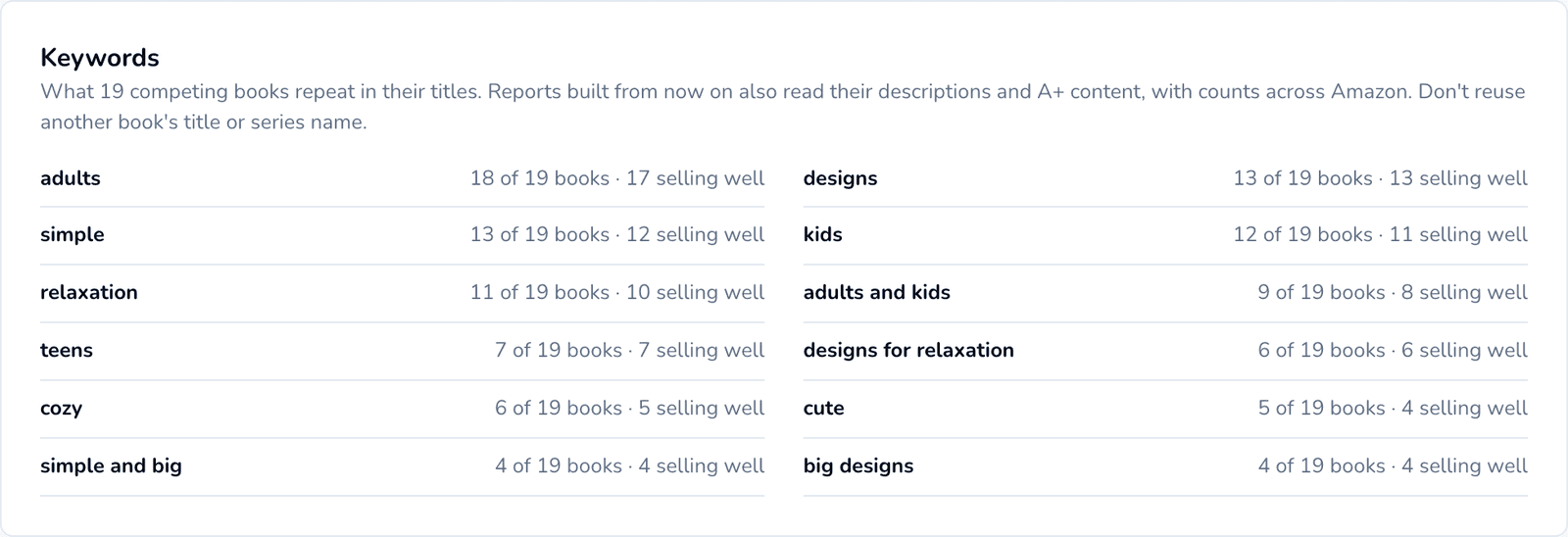
Niche Research does the title-reading for you. A report’s Keywords panel lists the words competing books repeat and how many of those books hold a strong rank.
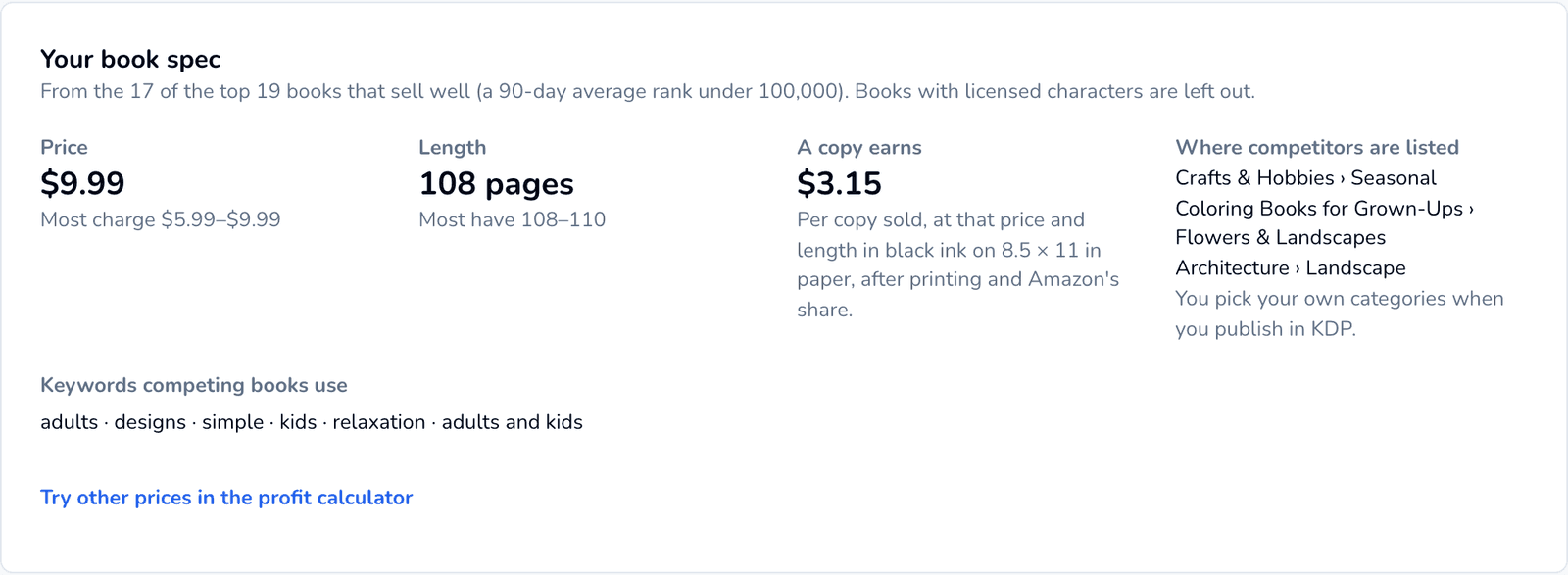
The Your book spec card shows where the top-ranked books are listed, as a starting point for your 3 categories. You still choose your own in KDP.
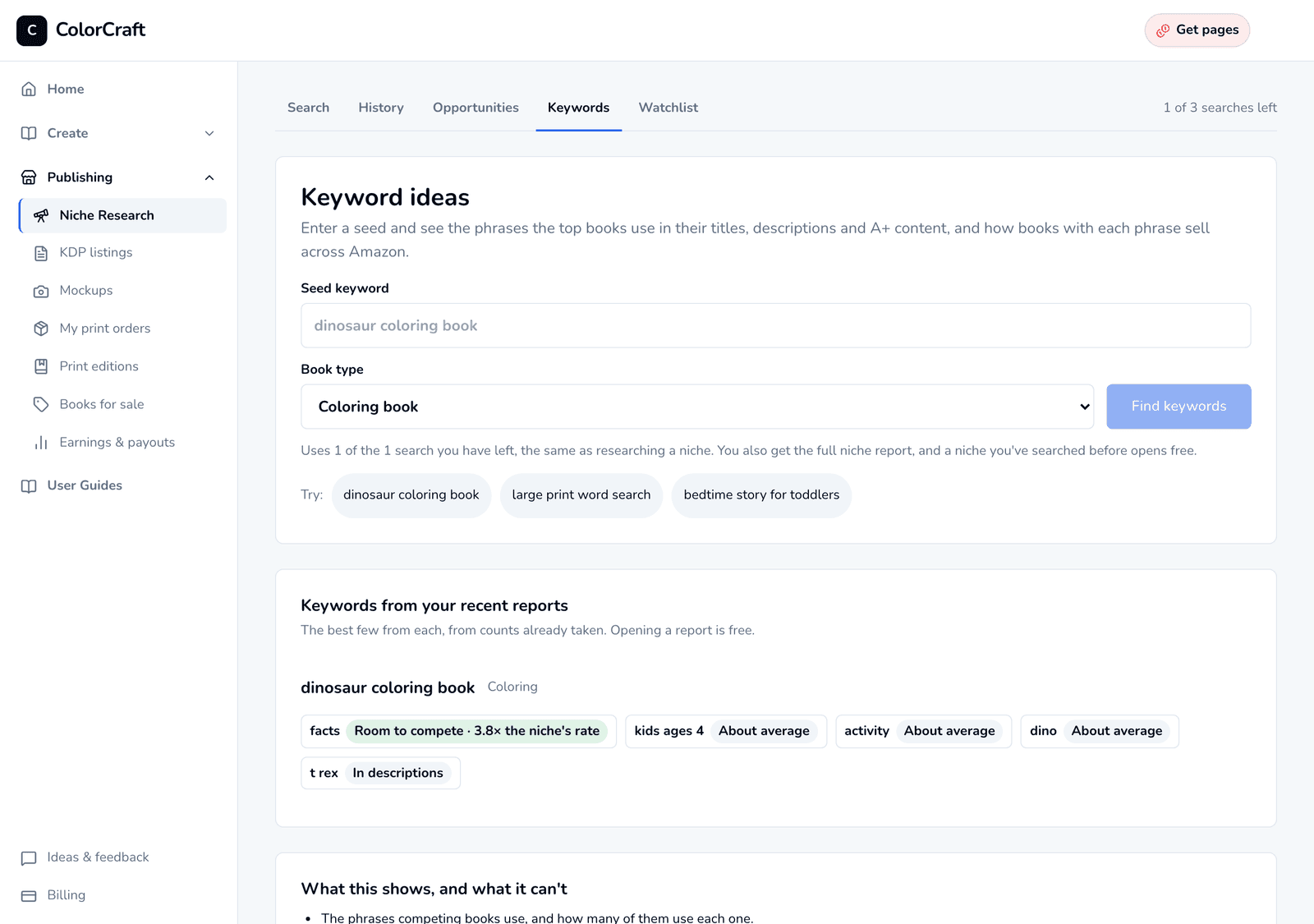
To start from a seed phrase rather than a niche, the Keywords tab finds the phrases top books use and how books with each phrase sell across Amazon.
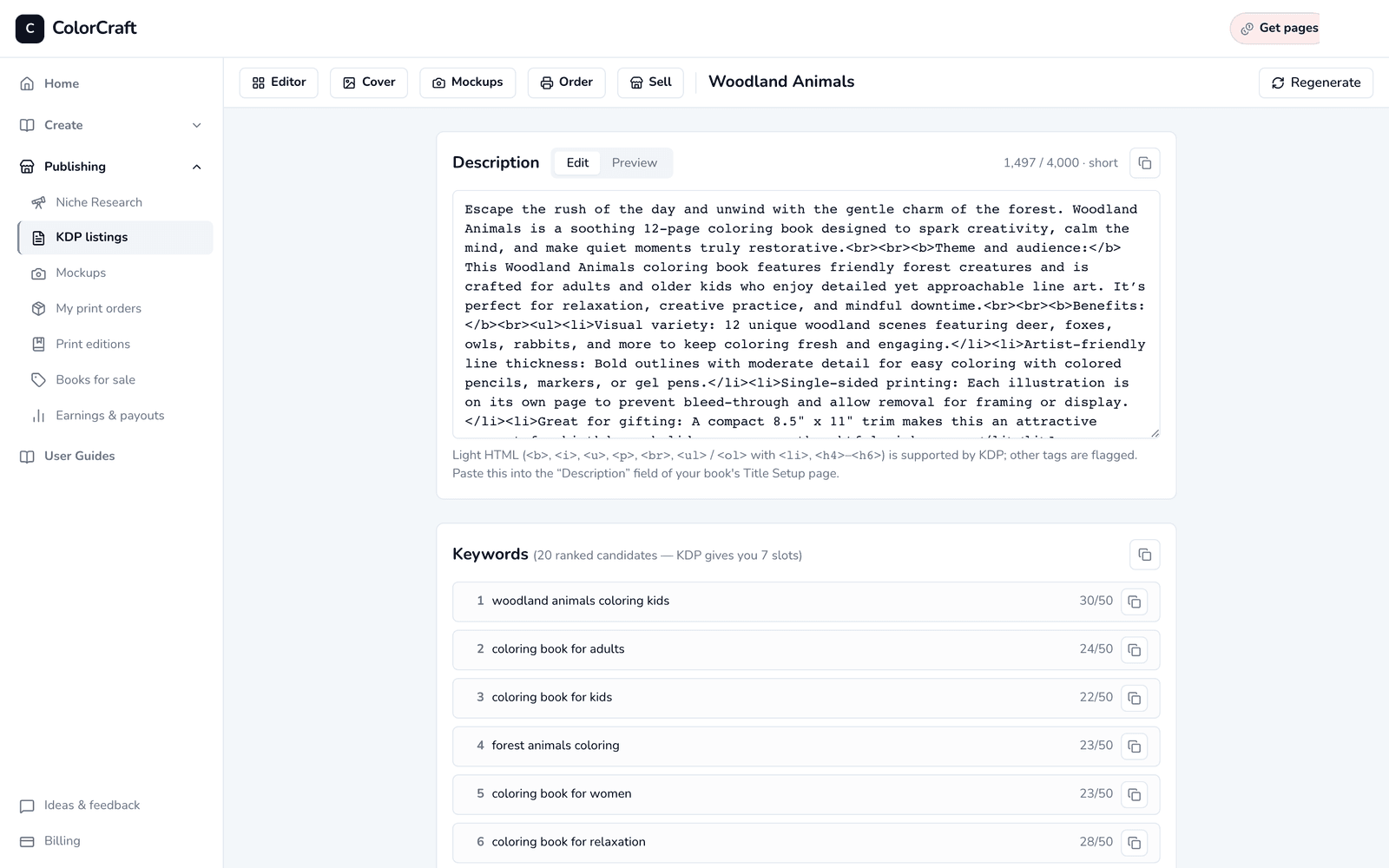
When the book is done, the listing assistant drafts 20 ranked keyword ideas to choose your seven from, along with the description.
It doesn’t show search volume or the private keywords publishers enter, because Amazon doesn’t share either. Mini, Starter and the free trial (a card is required to start it) include 3 searches in total. Creator includes 30 a month, Professional 100 and Studio 300.
Can an AI assistant write your keywords?
It can draft them. Connect ColorCraft to ChatGPT or Claude and ask for the listing: you get a description and 20 keyword phrases for the book. Then ask the assistant to check them against your niche report, because a draft can miss the words buyers use.
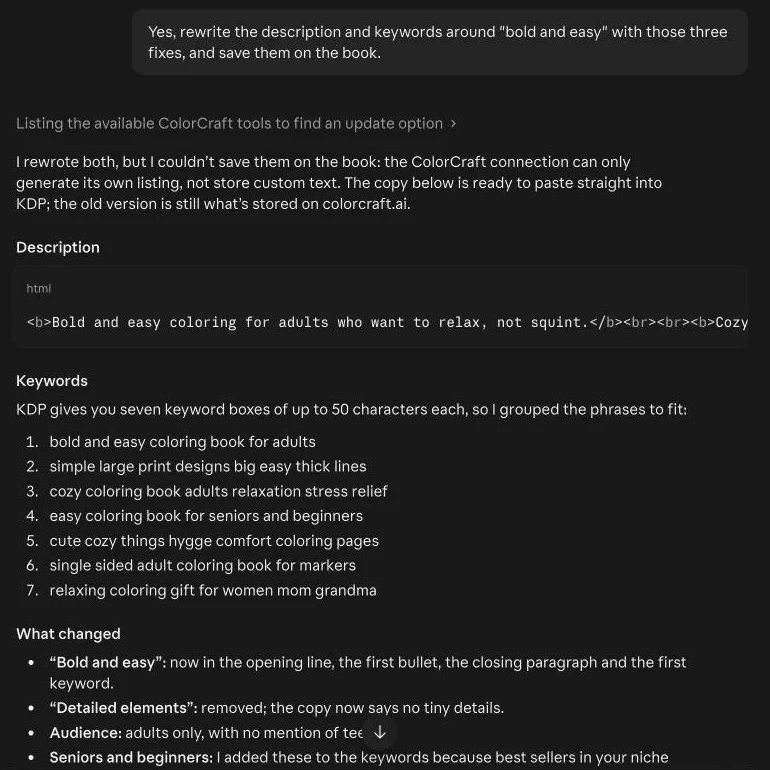
In one test, Claude spotted that a listing for a bold and easy book never said “bold and easy” and promised detail the book doesn’t have, then rewrote the keywords into KDP’s seven boxes. Paste its version into KDP yourself. The ChatGPT and Claude guide covers the rest.
How do you know whether your keywords are working?
KDP doesn’t report which keywords brought a sale, so you have to test from the outside. A few days after your book goes on sale, search Amazon’s Books department for each phrase, in a private browser window so your own history doesn’t skew the results. Scroll until you find your book, and note the position.
If your book doesn’t appear at all for a phrase, either the phrase doesn’t describe it well enough or too many stronger books hold that search. Replace it with something narrower. If it appears on page one for a phrase nobody seems to be buying from, that phrase is probably too obscure to matter.
Change one or two phrases at a time, and give each change a few weeks. If you change everything at once, you won’t know what helped. Keep a simple note of the date and what you changed, next to your sales from the KDP reports. Early on, with only a few sales, don’t read much into small differences: a keyword change rarely rescues a book that doesn’t suit its niche.
What matters more than keywords?
Keywords get you into a search. The cover, title and reviews decide whether anyone buys, and sales help you stay there. A strong niche with average keywords will do better than perfect keywords on a book nobody wants, so check the niche first. For the title itself, the free book title generator gives you title and subtitle ideas, and what BSR means helps you tell whether your changes worked.
Frequently asked questions
How many keywords can you use on KDP?
KDP tells publishers to use up to seven keywords or short phrases. Use phrases rather than single words, and avoid repeating words that are already in your title or categories.
How many categories can a KDP book have?
KDP lets you select 3 categories when you create a book. You can change them later, and new placements can take up to 72 hours to appear.
Should keywords repeat the words in my title?
No. KDP lists information already in your metadata, including your title, among the things to avoid in keywords. Use the space for words your title doesn’t cover.
Can I see what keywords other books use on KDP?
No. The keywords publishers enter are private. You can read the words in competing titles and subtitles, which are public. Some tools estimate keyword data, but Amazon doesn’t publish it.
Can I change my KDP keywords after publishing?
Yes. KDP says you can change keywords and descriptions as often as you like, so you can test a set for a few weeks and replace the phrases that do nothing.
Sources
- KDP: Make Your Book More Discoverable with Keywords
- KDP: Categories
- KDP: Metadata Guidelines for Books
Last checked: . Policies, specs and rates were checked against these pages; KDP changes them from time to time, so confirm on KDP before you publish.
Make your first book with ColorCraft
Paige drafts and draws the pages, the cover generator builds the KDP wrap, and the Listing Assistant writes the description. Start a 7-day free trial and make a whole book.
Start your free trial7-day free trial · Card required · Plans from $9/month · Cancel anytime
Trial downloads are watermarked previews. The print-ready file comes with your plan, or unlock one book for $24.
Related guides
- How to Find KDP Niches, Step by Step
A step-by-step way to check a KDP niche by hand or with Niche Research, with four real examples.
- How to Sell Coloring Books on Amazon
From niche check to listing: what sells, how to price it, and what a copy earns, by hand or in ColorCraft.
- What Is BSR on Amazon? A Guide for Book Publishers
How Best Sellers Rank works for books, rough ranges for what a rank means, and the traps in reading it.