How to Make a Coloring Book with ChatGPT or Claude
Updated By the ColorCraft team7 min read
Short answer
ChatGPT can draw coloring pages, but a chat on its own gives you separate images, not a book KDP will take: you still need a 24-page interior PDF at trim size and a cover wrap sized to the spine. Connect ColorCraft to ChatGPT or Claude and the assistant can do the whole job in your ColorCraft account, from niche research to the print files, while you approve what it spends.
Key takeaways
- ChatGPT and Claude are good at ideas, page prompts and listing text.
- KDP needs one interior PDF of at least 24 pages and a separate cover wrap PDF, not a folder of images.
- Connect ColorCraft at https://colorcraft.ai/api/mcp and the assistant can research, plan, draw and export the book for you.
- A 24-page coloring book uses 24 pages; planning, the listing and both PDFs are free.
- You set what the assistant may do and spend, and you can disconnect it at any time.
- You still upload to KDP yourself, and you disclose AI-generated images there.
Can ChatGPT make a coloring book?
It can make the pages. Ask ChatGPT for a black-and-white line drawing of a fox in a forest and you get one. It is also good at the parts around the pictures: theme ideas, a list of page prompts, a title, a description.
What a chat doesn’t give you is a book. KDP takes a paperback as one interior PDF and one cover file, not as a folder of images. The interior has to be at your trim size, with 0.125" of bleed on every edge if the art runs to the edge, and at least 24 pages. The cover is one wrap (back, spine and front) whose width depends on the page count and paper.
People who make coloring books with ChatGPT alone usually end up doing that assembly by hand in a design tool: downloading each image, checking it is a clean line drawing, placing it on a page, adding blank backs, then building the cover. That is where most of the hours go.
What does a KDP coloring book need that a chat doesn’t give you?
| What the book needs | Chat on its own | With ColorCraft connected |
|---|---|---|
| A niche worth making | Ideas from the model, no Amazon data | Niche Research on Amazon US sales ranks, with a verdict |
| Pages in one consistent style | One image at a time | A planned book, drawn in one style |
| At least 24 pages at trim size | You lay them out | Interior PDF at 8.5 × 11, 8 × 10, 7 × 10, 6 × 9, 5.5 × 8.5, and 5 × 8 inches |
| A cover wrap with the right spine width | You build it | Cover wrap PDF sized for the page count |
| An Amazon description and keywords | You copy and paste | A listing with 20 keyword phrases |
The assistant stays the part you talk to. ColorCraft does the work that has to be exact, in your own account, so you can open the book on colorcraft.ai at any point and change it by hand.
How do you connect ColorCraft to ChatGPT or Claude?
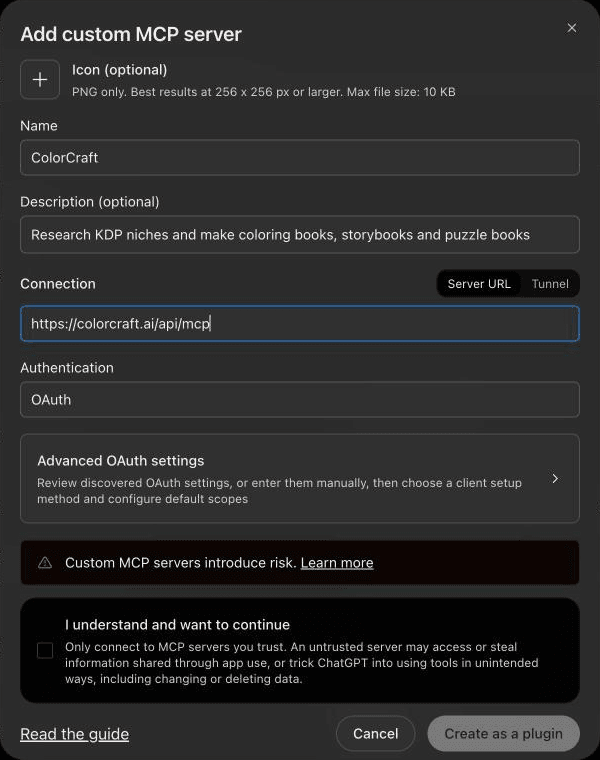
ColorCraft works as an MCP server. MCP is the Model Context Protocol, the standard ChatGPT, Claude and other assistants use to call outside tools. You add one address, https://colorcraft.ai/api/mcp, and sign in.
- In ChatGPT or Claude, open the connector settings and add a custom connector with that address.
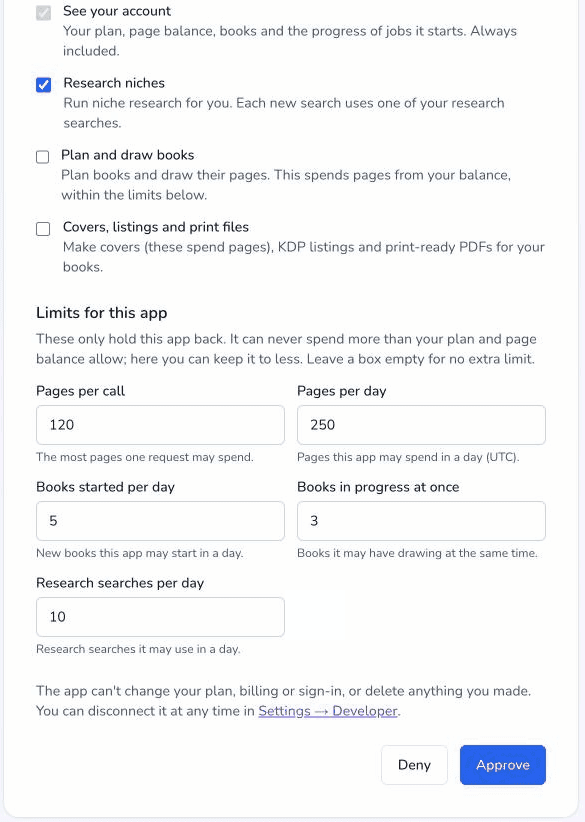
- A ColorCraft page opens. Sign in or sign up, check the app’s name, and tick what it may do: research, plan and draw books, and covers, listings and print files.
- Set how much it may spend, then click Approve. The assistant never sees your password.
- Ask “What can I make with the pages I have left?” to check it works. Reading your account is free.
Any ColorCraft account can connect; making books needs a plan or the free trial (a card is required to start it), as on the website. Claude Code, Cursor and your own agents use an API key instead, which comes with Creator or higher. AI assistants & API keys has the set-up for each one.
How do you make the book, step by step?
Connect ColorCraft
In your assistant's connector settings, add a custom connector with the address https://colorcraft.ai/api/mcp, sign in to ColorCraft and choose what it may do and spend.
Pick a niche
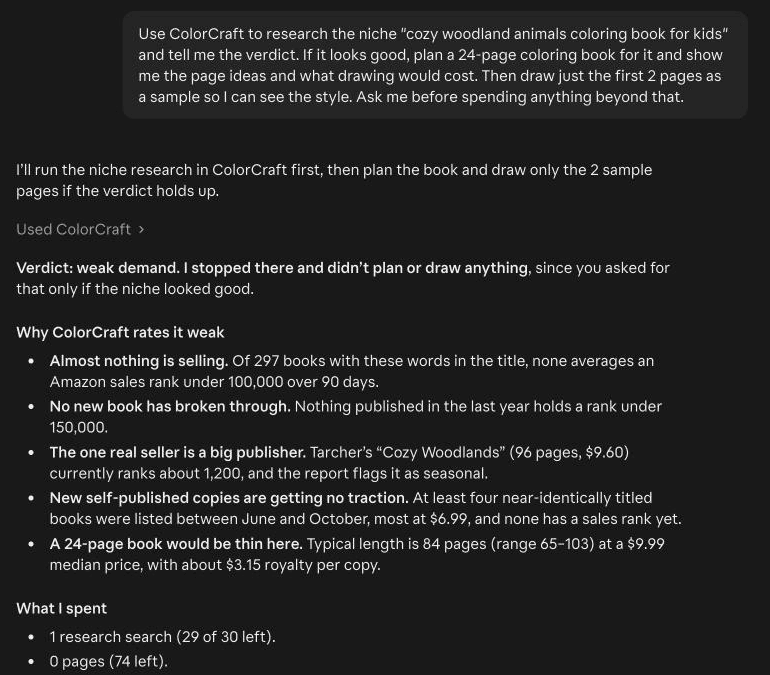
Ask for a low-competition coloring book niche, or name one, and read the verdict before you choose.
Check the plan
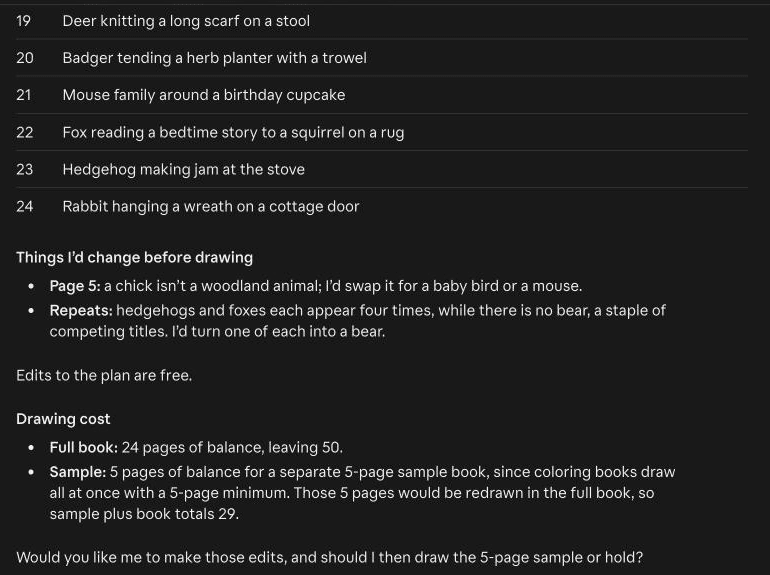
Ask the assistant to plan the book and show you every page idea and the cost before anything is drawn. Change the ideas you don't like.
Draw the pages
Say go. The pages draw in your ColorCraft account, and the book appears on your Home page if the chat ends early.
Finish the book
Ask for the cover, the Amazon listing, the cover wrap PDF and the interior PDF, then download the files.
Upload to KDP
Create the paperback in KDP, upload both PDFs, paste the listing, disclose the AI-generated images and order a proof if you want one.
What can you ask the assistant to do?
- Research: this week’s strongest niches, or a report on one you name, with price and page-count guidance. Opening a weekly pick is free; a new report uses a search from your Niche Research allowance, not pages.
- Plan: a prompt for every page from a theme, a niche report or your own list, shown to you before anything is drawn.
- Draw: the whole book in one style. It draws in the background, so you can close the chat and ask “What’s still drawing?” later.
- Finish: front-cover art, the title and back-cover text, the cover wrap PDF, the interior PDF, and the Amazon description with keyword phrases.
- Your account: your balance, your books and how far along each one is, including books you made on colorcraft.ai.
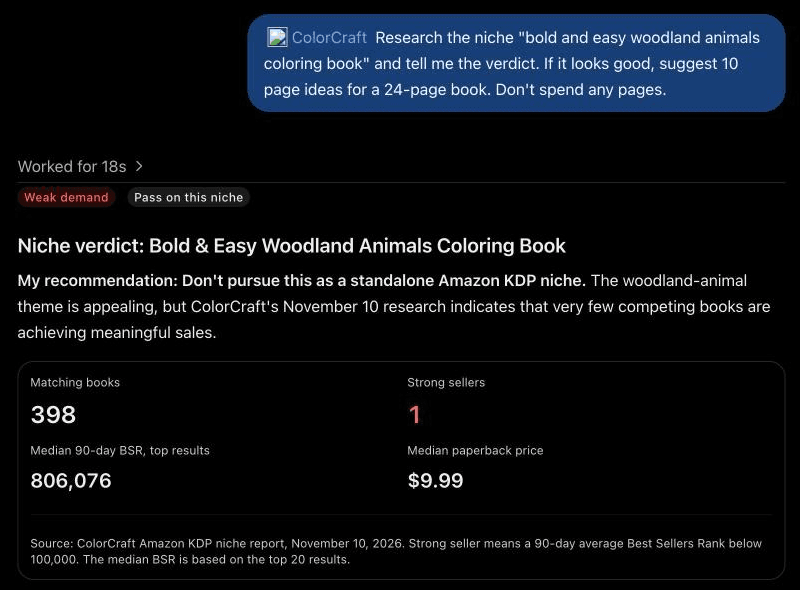
ChatGPT reads the same reports. Here it passed on a niche and pointed to a stronger one from earlier research, without spending a page.
The same connection makes storybooks and puzzle books too. Using ColorCraft with an AI assistant has a walkthrough with example messages for each.
How much does it cost?
An assistant uses the same balance of pages as the website, at the same prices. A coloring page uses 1 page, so a 24-page book uses 24 pages. New front-cover art uses 2 pages. Planning, changing the plan, the listing, the cover wrap PDF and the interior PDF are free.
The 7-day free trial (a card is required to start it) includes 40 pages, enough for a complete 24-page book. Trial downloads are watermarked previews; the print-ready file comes with a plan (from $9/month), or you can unlock a single book for $24. See pricing for the plans.
Pages aren’t given back because an assistant misread what you wanted, so check the plan before you say go. That is the single habit that saves the most.
How do you stay in control of what it spends?
- Choose what each app may do. Research, plan and draw, and covers and print files are allowed separately.
- Set its limits. Every call that spends carries a limit, and if the cost is higher, nothing starts.
- Ask it to check with you before it spends. Say so in your first message.
- See what it did. The Developer page in your account menu shows each app’s calls and pages over the last 7 and 30 days.
- Stop it at once. Disconnect the app on the Developer page. Removing ColorCraft inside ChatGPT or Claude only deletes the app’s copy.
Things only you can do stay in your browser: starting a plan or the free trial (a card is required to start it), getting more pages, raising a limit and accepting new Terms. The assistant gives you a colorcraft.ai link and carries on once you’re done. It never takes payment.
What do you still do yourself?
- Upload to KDP. Amazon KDP has no upload API, so no assistant can publish for you. You create the paperback, upload the two PDFs and paste the listing. Upload your book to KDP walks through it.
- Disclose AI images. KDP asks whether a book contains AI-generated content. AI-drawn pages count, even if you edited them.
- Look at every page. Open the book on colorcraft.ai before you export and redraw any page you don’t like. You know your buyer better than the assistant does.
- Pick your own subject. Licensed characters, brands and real people are refused, so describe your own.
Amazon decides whether to accept a book. The files are built to KDP’s published specs, and KDP reviews every book.
Frequently asked questions
Can ChatGPT make a coloring book for KDP by itself?
It can draw the pages and write the ideas and listing, but on its own you get separate images. KDP needs one interior PDF of at least 24 pages at trim size and a cover wrap sized to the spine, which you would have to build by hand.
Does this work with Claude as well as ChatGPT?
Yes. Both connect with a custom connector and a ColorCraft sign-in. Claude Code, Cursor and your own agents connect with an API key.
Can the assistant publish the book on Amazon for me?
No. Amazon KDP has no upload API, so you upload the interior PDF and the cover wrap and paste the listing yourself. Amazon decides whether to accept the book.
What does a coloring book cost to make this way?
A coloring page uses 1 page of your ColorCraft balance, so a 24-page book uses 24 pages. New front-cover art uses 2 pages. Planning, the listing and both PDFs are free.
Can the assistant spend my pages without asking?
Only within the limits you set when you connect it. Every spending call carries a limit, you can ask it to check with you first, and you can disconnect it at any time from the Developer page.
Do I have to disclose AI on KDP?
Yes. KDP asks whether a book contains AI-generated content, and AI-drawn coloring pages count even if you edited them afterwards.
Sources
- KDP: Paperback Submission Guidelines
- KDP: Set Trim Size, Bleed, and Margins
- KDP: Create a Paperback Cover
- KDP: Content Guidelines (AI-generated content)
- Model Context Protocol: Introduction
Last checked: . Policies, specs and rates were checked against these pages; KDP changes them from time to time, so confirm on KDP before you publish.
Make your first book with ColorCraft
Paige drafts and draws the pages, the cover generator builds the KDP wrap, and the Listing Assistant writes the description. Start a 7-day free trial and make a whole book.
Start your free trial7-day free trial · Card required · Plans from $9/month · Cancel anytime
Trial downloads are watermarked previews. The print-ready file comes with your plan, or unlock one book for $24.
Related guides
- How to Make and Publish a Coloring Book on Amazon KDP
End-to-end tutorial: theme, interior pages with Paige, blank backs, cover wrap, listing, bleed export and the KDP upload screens.
- AI Coloring Page Prompts That Print Cleanly
A prompt formula for printable coloring pages (subject, setting, audience, line style), with before/after examples and fixes.
- Can You Sell AI Coloring Books on Amazon KDP?
KDP allows AI-generated coloring books if you disclose AI-generated images and text at upload; covers the disclosure, the weekly title limits, and the quality bar.